





Are you unsure whether Managed cPanel VM 2 vs VM 3 package is the better fit for your website? You’re in the right place. Choosing the correct hosting environment is the first step towards a faster, more reliable website.
If you’re deciding between Managed cPanel VM 2 and Managed cPanel VM 3, this guide explains the essential differences so you can select the package that matches your performance needs and growth plans.
TABLE OF CONTENTS
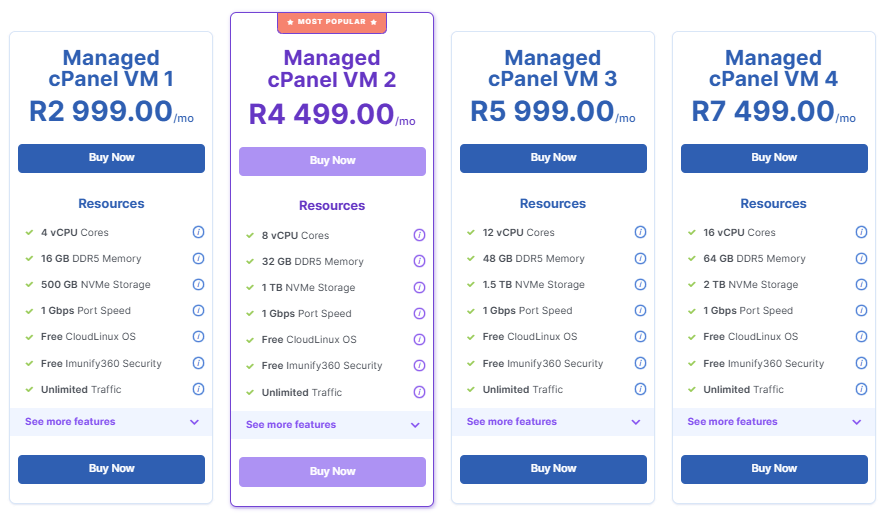
Comparison Table: VM 2 vs VM 3 Package
| Feature | Managed cPanel VM 2 | Managed cPanel VM 3 |
| Monthly Price | R4 499/mo | R5 999/mo |
| vCPU Cores | 8 vCPUs | 12 vCPUs |
| DDR5 Memory | 32 GB | 48 GB |
| NVMe Storage | 1 TB | 1.5 TB |
| Port Speed | 1 Gbps | 1 Gbps |
| CloudLinux OS | Free | Free |
| Imunify360 Security | Free | Free |
| Unlimited Traffic | Yes | Yes |
| Ideal For | Mid-sized agencies | Larger agencies and high-traffic environments |
When to Choose Each Package
- You are upgrading from VM 1 and require more power for expanding client sites.
- You’re hosting several mid-sized WordPress or ecommerce stores.
- The business is stable and growing, but not enterprise-scale yet.
- Your brand manages 30 to 100 cPanel accounts.
- Strong performance is required, without the cost of more advanced hardware.
- You run multiple high-traffic websites or large ecommerce stores.
- Clients require fast page loads under heavy concurrency.
- Your brand plans to onboard many new cPanel accounts in the short term.
- Additional RAM is required for caching, PHP workers, Redis, and heavier workloads.
- The focus is on a server ready for advanced hosting environments such as LMSs, booking systems, web apps, and large database-driven platforms.
Additional Information
- Both packages include full server management with optimisations and security hardening.
- Daily automated JetBackup off-site backups are included at no charge.
- Enterprise-grade AMD EPYC processors ensure low latency and high throughput.
- CloudLinux, KernelCare and Imunify360 are included for maximum security and stability.
- Both are hosted at Teraco, Johannesburg, with redundant networking and power.
- These options both provide unlimited traffic with optional traffic throttling after 20 TB/month.
What is Managed cPanel Hosting?
Managed cPanel VM Hosting is a high-performance web hosting solution that provides you with your own virtual machine (VM), complete with the familiar and easy-to-use cPanel control panel. You enjoy dedicated resources and powerful server capabilities, without having to manage any of the technical backend.
With Domains.co.za, all server administration tasks are fully taken care of for you, including operating system management, security hardening, software updates, backups, monitoring, and performance tuning. You enjoy a robust, reliable hosting environment and can focus on your websites, projects, and clients.
How Managed cPanel VM Hosting Differs from Standard cPanel Hosting
Managed cPanel VM Hosting stands apart from standard cPanel hosting by giving you an isolated virtual server with dedicated CPU, RAM, storage, and IP resources. This means your performance is consistent, predictable, and not affected by other users.
Traditional cPanel hosting operates in a shared environment, where resources are distributed among many users. While it still includes the cPanel interface, you do not receive root access or the ability to customise the server to your specific requirements, which is why it’s better suited to smaller or less resource-intensive websites.


