


A Better WordPress Landing Page Can Turn More Visitors nto Enquiries, Leads, & Sales
Many South African businesses spend real money on Google Ads, WhatsApp campaigns, and social media posts, instead of sending all that traffic to their homepage or a general service page.
Those pages weren’t built to convert; they are built for browsing. A visitor who clicks your ad and lands on a page full of menus, links, and competing messages is far less likely to take the action you want.
A WordPress landing page solves that. It offers your campaign traffic a single, focused destination and a clear action to take. This guide explains what a good landing page looks like, how to build one in WordPress, and what South African businesses specifically need to consider before sending traffic to it.
KEY TAKEAWAYS
- A WordPress landing page works when it’s built around a single goal: one headline, one offer, one action.
- Choose your build method based on your technical skills, the timeline, and the campaign’s actual requirements.
- In South Africa, mobile performance, load-shedding resilience, and local trust signals directly affect whether your landing page converts.
- Don’t send traffic to a page until the form, tracking, SSL, and mobile layout are all confirmed and working.
TABLE OF CONTENTS
What Is a WordPress Landing Page?
A WordPress landing page is a single web page built around one specific goal. That goal could be collecting quote requests, selling a product, getting event sign-ups, or booking appointments. Everything on the page, the headline, the copy, the form, and the button directs the visitor towards that one action.
It’s different from the rest of your website because it isn’t trying to do multiple things at once. You build it inside WordPress and, depending on your technical comfort level and campaign requirements, you can create one using the Block Editor, a landing page plugin, your theme’s built-in tools, or custom code.
Landing Page vs Standard Website Page: Why the Difference Matters
Your standard service or product page is built for browsing. It has a navigation menu, links to other sections, and likely covers several of the things your business offers. That’s fine for visitors who are exploring, but it isn’t the right destination for someone who has just clicked a specific ad or campaign link.
When a visitor clicks your Google Ad for “office cleaning in Pretoria” and lands on your general homepage, there’s a disconnect. They must search for what was promised to them. Most won’t bother.
A landing page removes that friction. It picks up exactly where your ad or campaign left off and gives the visitor one clear path forward. That alignment between your campaign message and your landing page is what improves conversion rates.
Why Landing Pages Matter for South African Businesses
South African businesses run campaigns across a wide range of channels, and each one benefits from a dedicated landing page that matches the message the visitor saw before they clicked.
Some of the most common use cases include:
- Google Ads and Bing campaigns.
- Facebook and Instagram ads.
- LinkedIn campaigns.
- WhatsApp campaigns.
- Email marketing,
- Product promotions and seasonal sales.
- Event and webinar registrations.
- Quote requests and local service enquiries.
- Lead magnets and free downloads.
- Appointment bookings.
The logic is consistent across all of them. If someone clicks a Black Friday promotion and lands on your homepage, they still need to find the deal. If they land on a dedicated promotion page that shows the offer, the price, and a buy button, nothing stands between them and conversion.
That’s why landing pages matter, not just in theory, but in the day-to-day reality of running campaigns in a competitive local market.
The Core Goal of a Landing Page: One Page, One Action
A WordPress landing page works because it’s focused. Every element on the page, including the headline, copy, images, form, and button, should serve one conversion goal and nothing else.
If you are collecting leads, the entire page should guide the visitor towards filling in the form. If you’re promoting a product, everything should move them towards purchasing it.
The moment you add a second CTA, a link to your blog, or a promotion that’s unrelated to the campaign, you’re giving visitors a reason to leave without converting.
Remember, focused pages convert; cluttered pages don’t.
The Essential Components of a High-Performing WordPress Landing Page
A landing page doesn’t need to be long or complex. It needs to be correct. These are the core components that determine whether your page earns the conversion or loses it.
A Clear, Benefit-Led Headline
The headline is the first thing a visitor reads, and it either keeps them on the page or loses them immediately. It should tell visitors exactly what they will get and why it matters to them.
For example:
- “Get a Free Quote for Office Cleaning in Cape Town” is a compelling headline.
- “Welcome to Our Website” isn’t.
Your headline also needs to match the message from the ad or campaign that brought the visitor there in the first place. If your ad says, “Book a Free Consultation Today“, and your landing page headline says something different, that mismatch creates doubt. So, ensure you keep them aligned.
Supporting Copy That Focuses on the Visitor’s Problem
The copy that follows your headline should be short, specific, and written from the visitor’s point of view. They aren’t there to read about your company’s history or your mission statement. They want to know whether you can solve their problem and how quickly you can do it.
Write in short paragraphs. Directly address the visitor’s situation. Explain what they get, what happens next, and why your offer is worth their time. Clear, concise wording always outperforms lengthy and impressive-sounding content.
A Strong CTA That Matches the Campaign Goal
Your call-to-action button needs to be specific and action-led.
For example:
- Request a Free Quote.
- Book Your Consultation.
- Download the Guide.
All of these tell the visitor exactly what happens when they click. However, if you use CTAs like “Submit” and “Click Here”, visitors don’t have any idea.
On shorter pages, one well-placed CTA is enough. On longer pages, repeat the button at logical points so visitors don’t have to scroll back up to act. Also, make it visually prominent and easy to find on both desktop and mobile.
Visuals That Support the Offer
Images and visuals aren’t decoration. They serve a purpose.
- A photo of your team builds familiarity.
- A product image confirms what’s being sold.
- A short video explanation can answer questions before the visitor even thinks to ask them.
Use visuals relevant to the offer and compress every image file before uploading. Large, uncompressed images are one of the most common reasons landing pages load slowly, and a slow page loses visitors before they have read a single word.
A Form That Asks for Only What Is Needed
Every extra field on a form is a reason for someone not to fill it in. If you need a name, an email address, and a phone number, ask for those three things and stop there. Keep the barrier to entry as low as possible.
There are cases where a longer form is necessary. A quote request for a construction project might reasonably need a site address and a brief project description. In those situations, every field should still earn its place. If you can follow up to get the information, don’t ask for it upfront.
Trust Signals That Reduce Hesitation
South African visitors want to see proof before they commit. Customer testimonials, Google reviews, client logos, professional accreditations, and clear business contact details all reduce the natural hesitation that comes with filling in a form or making a purchase online.
If you’re selling through the landing page, a visible SSL indicator or secure checkout badge matters. If you’re collecting personal information, a short privacy notice near the form reassures visitors that their details won’t be misused. Trust signals don’t need to be prominent or heavy-handed; they just need to be there.
A Distraction-Free Layout
Your navigation menu offers visitors a way out. So do sidebar links, unrelated promotions, and a footer full of other pages. On a WordPress landing page, those elements work against you.
Remove or hide the menu. Strip back the footer. Give visitors one path: forwards towards the conversion. The cleaner the layout, the less likely they are to wander off before completing the action you built the page for.
4 Ways to Create a WordPress Landing Page
WordPress doesn’t lock you into a single way to build a landing page. Depending on your technical skill, timeline, and campaign needs, there are four practical approaches to choose from:
Using the WordPress Block Editor or Full Site Editing
If you’re running a block-based theme, Full Site Editing (FSE) lets you build a custom landing page template directly inside WordPress without installing a single plugin. You work with drag-and-drop blocks to control the layout, content, and structure of the page from within the native WordPress Editor.
It’s a clean approach for users who are already comfortable in WordPress and want to avoid adding more plugins to their site. You have solid control over how the page looks and what goes on it.
The limitation is that your design flexibility is tied to what your active theme supports, so results vary depending on which theme you’re using.
Here’s how to create a landing page using the Twenty Twenty-Four theme:
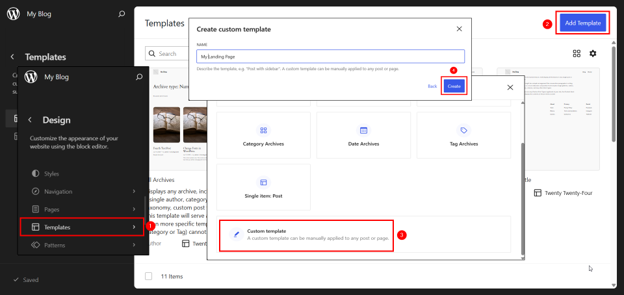
1. Go to WordPress Dashboard → Appearance → Editor. This opens the Full Site Editor (FSE).
2. In the FSE, click on Templates from the left-hand panel. This shows you all the existing page templates on your site.
3. Click Add Template. A pop-up will appear asking what the template should apply to. Select Custom Template.
4. Give your template a clear name (e.g., “Landing Page“). Then click Create.
- You’ll be asked to choose a pattern to start with. Skip this and start with a blank canvas. This gives you full control over the layout from the beginning.
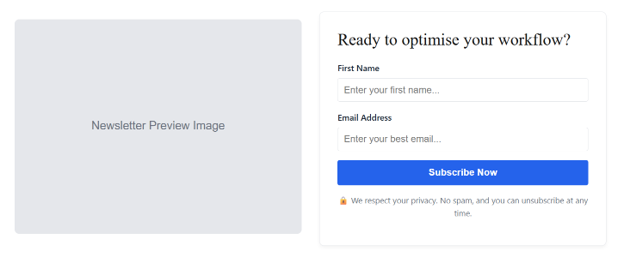
- For a mailing list sign-up landing page, a typical structure would be:
- A Cover or Group block at the top for your hero section, with a headline that tells visitors what they’ll get by subscribing.
- A Paragraph block for your supporting copy explaining the value of joining your list.
- A Spacer block to create breathing room between sections.
- A Columns block if you wish to display benefits or what subscribers can expect side by side.
- An Image block for any supporting visuals, such as a preview of your newsletter or a relevant product image.Use a Custom HTML block to embed code from your email marketing tool, such as Mailchimp or MailerLite, for the actual sign-up form.
- A Paragraph block below the form for a short privacy notice (e.g., “We respect your privacy. Unsubscribe at any time.”).
- A Spacer block at the bottom to close the page cleanly.
7. Click on each block and replace the placeholder content with your actual headline, copy, button text, and images. Use the right-hand panel to adjust colours, typography, spacing, and alignment for each block.
8. Twenty Twenty-Four doesn’t have a native one-click toggle to remove the header and footer from a custom template, but since you’re building in the FSE, your custom template starts blank by default, without them, unless you add them manually. Just don’t add a Header or Footer block if you prefer a distraction-free landing page.
9.Once you’re happy with the design, click Save in the top right-hand corner of the Editor.
IMPORTANT:
You may use Patterns to insert a sign-up form. You may also use one Custom HTML block to design your entire landing page in WordPress.
Using a Landing Page Plugin
WordPress landing page plugins are designed to make campaign pages faster to launch. For example, SeedProd include libraries of pre-built templates, drag-and-drop editing, built-in form fields, countdown timers, and integrations with popular email marketing platforms. You choose a template, customise the content, and publish without having to build anything from scratch.
Here are the steps to create a landing page using SeedProd:
- Go to Plugins → Add Plugin, search for SeedProd, click Install Now, then Activate.
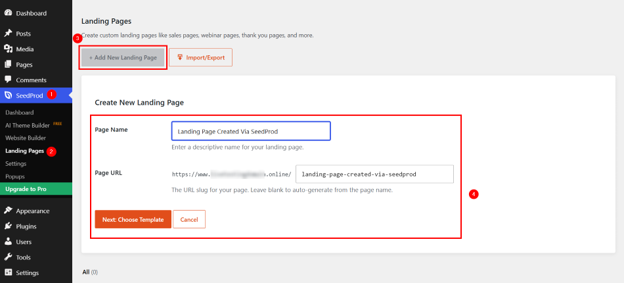
- Click SeedProd in the left menu, then go to Landing Pages.
- Click + Add New Landing Page.
- Name your page, set the URL, and click Next: Choose Template.
- Select a template that fits your campaign.
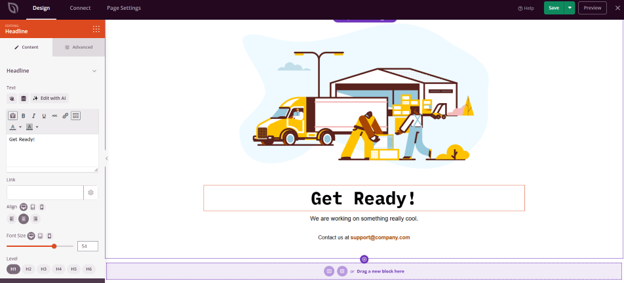
- Click any element to edit it. Replace the placeholder headline, copy, and button text with your own content. Adjust colours and fonts to match your brand.
- Click the form block (if any) and remove any fields you don’t need. For a mailing list page, a first name and an email address are enough.
- Replace placeholder images with your own. Compress images before uploading.
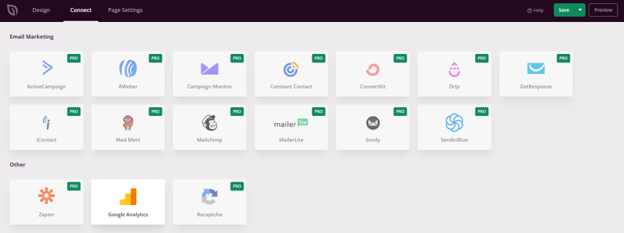
9. Go to Connect and link your email marketing platform, such as Mailchimp or MailerLite, then select your subscriber list.
NOTE:
Email marketing integrations are available on the SeedProd premium plan.
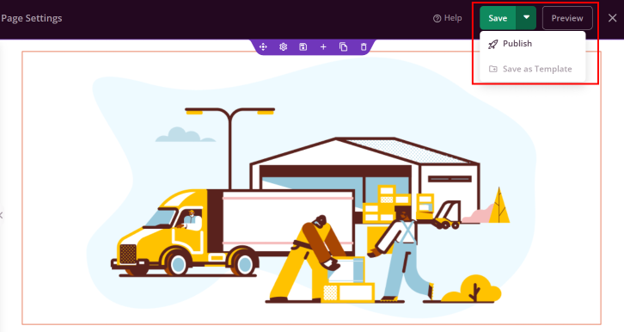
- Click Preview to check how the page looks on desktop and mobile.
- Click Save, then Publish. Copy the live URL and use it in your campaign.
The trade-off is worth understanding before you commit. Some landing page plugins add considerable weight to your site, which can affect load times.
Many of the more useful features, such as A/B testing, advanced integrations, and additional templates, are available only with a premium subscription. Before installing any plugin, check that it’s actively maintained, well-reviewed, and compatible with your current version of WordPress.
Using Your WordPress Theme’s Built-In Layout Options
Some WordPress themes include built-in landing page functionality. Themes like Astra include page templates with full-width layouts, options to hide the header and footer, sidebar controls, and container width settings that suit campaign pages well. If your theme supports these options, you can build a clean landing page without installing anything extra.
This approach works well when your campaign requirements are straightforward, and your theme already provides the layout control you need. However, it falls short in more advanced requirements.
Built-in theme tools aren’t designed to replace dedicated landing page builders, so if you need countdown timers, multi-step forms, or deep CRM integrations, you will likely need to look beyond what the theme offers.
Here’s how to create a landing page in WordPress using the Astra theme:
1. Go to Pages → Add Page and give your page a title, for example, “Download Your Free WordPress Guide“.
2. In the right-hand panel, look for Astra Settings. Under Container Layout, select Full Width for a clean, distraction-free layout.
3. Scroll down in the same panel and disable the Header, Footer, and Sidebar to remove unnecessary distractions from the page.
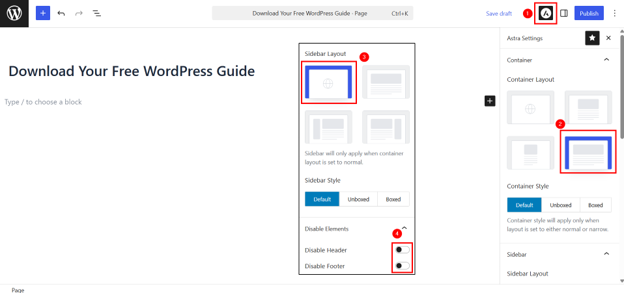
4. Click + in the Block Editor to start adding blocks. For this landing page, a simple structure would be:
- A Heading block for your main headline.
- A Paragraph block explaining what the guide covers and who it’s for.
- An Image block showing a preview or cover image of the guide.
- A Form block or shortcode from your form plugin to collect the visitor’s name and email address before they download.
- A Buttons block for your CTA.
- A short Paragraph block below the form for a privacy notice
5. Select the block and customise its colours, font sizes, and spacing in the right-hand panel.
6. Click Preview to check the layout on mobile and desktop.
7. Click Publish when everything looks good. Copy the URL to use it in your campaign.
Using Custom Code & Child Themes
Custom code provides the highest level of control over your landing page’s design, performance, and functionality. A developer can build a child theme, create a dedicated page template using PHP and HTML, and write custom CSS to produce exactly the layout and behaviour your campaign requires. No template constraints and no plugin dependencies are pulling in unnecessary scripts.
IMPORTANT:
This isn’t an approach for beginners, and it shouldn’t be treated as one. It requires solid knowledge of WordPress theme development, PHP, and CSS.
But for businesses running high-traffic campaigns where every second of load time directly impacts conversion rates, or for agencies that require a reusable landing page framework across multiple client campaigns, custom development delivers results that off-the-shelf tools often can’t match.
If you have coding experience, then you can create a WordPress landing page as follows:
Step 1: Create the Child Theme Folder
- Login to your hosting control panel and open File Manager.
- Navigate to the following directory and create a new folder called yourtheme-child:
public_html/wp-content/themes/Ensure you replace ‘yourtheme‘ with your actual theme name. For example, we’re using the Astra theme, so we’ll name it ‘astra-child‘.
Step 2: Create the style.css File
Inside your child theme folder, create a new file named style.css and add the following code:
```css
/*
Theme Name: Astra Child
Template: astra // the word ‘astra’ must match the exact directory name of the parent theme folder
Version: 1.0.0
*/
body {
    font-family: 'Arial', sans-serif;
    color: #333;
   background-color: #f9f9f9;
}

h1, h2 {
   color: #111;
    font-weight: 700;
    margin-bottom: 20px;
}

p {
    font-size: 16px;
    line-height: 1.6;
    color: #555;
}

.lp-container {
    max-width: 900px;
    margin: 0 auto;
    padding: 40px 20px;
    background-color: #fff;
    border-radius: 8px;
}

.lp-button {
    display: inline-block;
    background-color: #0073e6;
    color: #fff;
    padding: 12px 24px;
    border-radius: 5px;
    text-decoration: none;
    font-size: 18px;
}

.lp-button:hover {
    background-color: #005bb5;
}
```
If you’re using the Contact Form 7 plugin, keep in mind that it wraps its output in its own HTML structure, so its fields won’t automatically pick up styles from your .lp-container CSS. To keep the form visually consistent with the rest of the page, you’ll need to target CF7’s own elements in your style.css file, specifically .wpcf7-form input, .wpcf7-form label, and .wpcf7-form textarea.
Here’s the revised style.css file:
```css
/*
Theme Name: Astra Child
Template: astra // the word ‘astra’ must match the exact directory name of the parent theme folder
Version: 1.0.0
*/
body {

    font-family: 'Arial', sans-serif;
    color: #333;
    background-color: #f9f9f9;
}

h1, h2 {
    color: #111;
    font-weight: 700;
    margin-bottom: 20px;
}

p {
    font-size: 16px;
    line-height: 1.6;
    color: #555;
}

.lp-container {
    max-width: 900px;
    margin: 0 auto;
    padding: 40px 20px;
    background-color: #fff;
    border-radius: 8px;
}

.lp-button {
    display: inline-block;
    background-color: #0073e6;
    color: #fff;
    padding: 12px 24px;
    border-radius: 5px;
    text-decoration: none;
    font-size: 18px;
}

.lp-button:hover {
    background-color: #005bb5;
}

/* -----------------------------------------------
Contact Form 7 Styles
Uses a separate palette to visually distinguish
The form section from the rest of the page.
----------------------------------------------- */

.wpcf7-form {
    background-color: #f0f4ff;
    padding: 30px;
    border-radius: 10px;
    border: 1px solid #d0d9f0;
    margin-top: 30px;
}

.wpcf7-form label {
    display: block;
    font-size: 15px;
    font-weight: 600;
    color: #2c3e6b;
    margin-bottom: 16px;
}

.wpcf7-form input[type="text"],
.wpcf7-form input[type="email"] {
    display: block;
    width: 100%;
    margin-top: 6px;
    padding: 10px 14px;
    font-size: 15px;
    font-family: 'Arial', sans-serif;
    color: #333;
    background-color: #ffffff;
    border: 1px solid #aab8e0;
    border-radius: 6px;
    box-sizing: border-box;
    transition: border-color 0.2s ease;
}

.wpcf7-form input[type="text"]:focus,
.wpcf7-form input[type="email"]:focus {
    border-color: #4a6fcf;
    outline: none;
    box-shadow: 0 0 0 3px rgba(74, 111, 207, 0.15);
}

.wpcf7-form input[type="submit"] {
    display: inline-block;
    width: 100%;
    margin-top: 10px;
    padding: 13px 24px;
    font-size: 17px;
    font-family: 'Arial', sans-serif;
    font-weight: 700;
    color: #ffffff;
    background-color: #2c3e6b;
    border: none;
    border-radius: 6px;
    cursor: pointer;
    transition: background-color 0.2s ease;
}

.wpcf7-form input[type="submit"]:hover {
    background-color: #1a2a4a;
}

/* Validation error messages */
.wpcf7-not-valid-tip {
    font-size: 13px;
    color: #c0392b;
    margin-top: 4px;
    display: block;

}

/* Success and error response messages */
.wpcf7-response-output {
    margin-top: 16px;
    padding: 10px 14px;
    border-radius: 6px;
    font-size: 14px;
}

.wpcf7-mail-sent-ok {
    background-color: #eafaf1;
    border: 1px solid #27ae60;
    color: #1e8449;
}

.wpcf7-mail-sent-ng,
.wpcf7-validation-errors {
    background-color: #fdf2f2;
    border: 1px solid #e74c3c;
    color: #c0392b;
}
```
Step 3: Create the functions.php File
In the same child theme folder, create a new file named functions.php and add the following code:
```php
Step 4: Activate the Child Theme
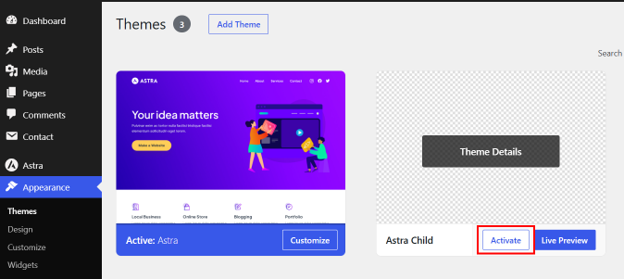
- Go to WordPress Dashboard → Appearance → Themes.
- Find Astra Child (your child theme) in the list, then click Activate.
Step 5: Create the Landing Page Template File
Back in File Manager, go to your child theme folder and create a new file called template-landing-page.php.
Add the following code:
```php


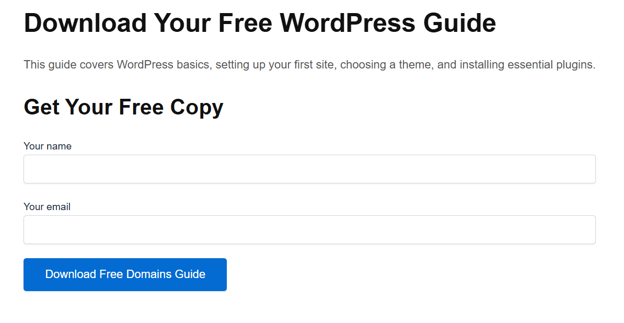
        Download Your Free WordPress Guide
        This guide covers WordPress basics, setting up your first site, choosing a theme, and installing essential plugins.
        Get Your Free Copy


```
Replace [your_form_shortcode_here] with the actual shortcode from your form plugin, such as Contact Form 7.
Step 6: Create & Publish the Landing Page
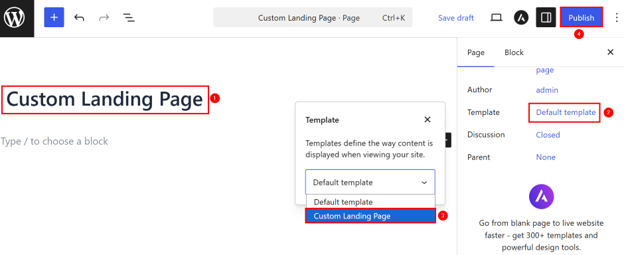
- Go to Pages → Add Page in WordPress.
- Give the page a title.
- In the right-hand panel under Page attributes, click the Template dropdown and select Custom Landing Page.
- Click Publish.
This is how the landing page design looks now:
EXPERT TIP:
If your landing page has a form, ensure that you submit a test entry after publishing to confirm your form works correctly.
Choosing the Right Landing Page Method for Your Business
The right method depends on your situation, not on what's most popular. However, before you choose a build method, ensure the basics are in place. If you don't have a domain yet, register a domain for your landing page first, then decide how you wish to build it:
| Situation | Best Method |
| Comfortable in WordPress, want fewer plugins | Block Editor / FSE |
| Need to launch fast with templates | Landing page plugin |
| Your theme already supports landing layouts | Theme built-in tools |
| Need full design control or complex integrations | Custom code with a developer |
Beyond the table, consider a few practical factors.
- If your campaign is time-sensitive, a plugin with ready-made templates takes you live faster than building from scratch.
- If you're running multiple campaigns over the long term, a custom-built template may cost more upfront but save time across every future launch.
- If budget is tight and your theme already supports full-width page layouts, there's no reason to pay for a premium plugin.
Match the method to what your business requires right now.
WordPress Landing Page Examples by Business Goal
Understanding how landing pages work in practice is more useful than theory alone. Here are five examples built around real South African business scenarios:
Lead Generation Landing Page
A Johannesburg plumbing company runs a Google Ads campaign targeting emergency plumbing repairs. Instead of sending visitors to their homepage, they direct traffic to a dedicated landing page that offers a free same-day quote.
The page has:
- A clear headline.
- A short three-field form.
- A click-to-WhatsApp button for visitors who'd rather not fill in a form.
It doesn't need anything else. The campaign message and the page are perfectly aligned, and the visitor has two easy ways to get in touch.

eCommerce Promotion Landing Page
An online store promoting a Black Friday product bundle builds a dedicated landing page rather than directing traffic to its standard shop page.
The page leads with the offer and discount, shows clear product images, includes a countdown timer to create urgency, and links directly to the checkout. Visitors don't browse the rest of the store; they see the deal and act on it.
Download or Lead Magnet Landing Page
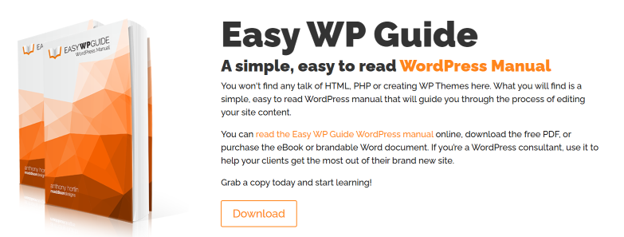
A Cape Town-based financial adviser offers a free retirement planning checklist to build their email list. Visitors land on a simple page that explains what the checklist covers and why it's useful, then enter their name and email to download it.
The form connects directly to their email marketing platform, automatically triggering a welcome sequence. The page is short, the offer is specific, and the barrier to entry is low.
IMPORTANT:
If you're sending follow-up emails to leads, professional email hosting for lead follow-ups improves deliverability and keeps your messages out of spam folders.
Event or Webinar Registration Landing Page
A training company running a monthly business skills workshop uses a landing page to handle all registrations. The page shows the event date, time, and location, introduces the speaker, outlines what attendees will learn, and includes a registration form that automatically sends a confirmation email. There's no back-and-forth, no manual follow-up required, and no confusion about how to sign up.
Booking or Appointment Landing Page
A Durban physiotherapy clinic links its Instagram bio directly to a landing page with an online booking form. Patients choose a time slot, select the type of appointment they require, and confirm their booking without calling the practice. It's faster for the patient and reduces admin for the clinic. A simple landing page does the work that would otherwise require a receptionist.
South African Considerations for Landing Pages
Building a landing page that converts in South Africa means accounting for realities that generic international advice often misses. Three of them matter more than most:
Mobile-First User Behaviour
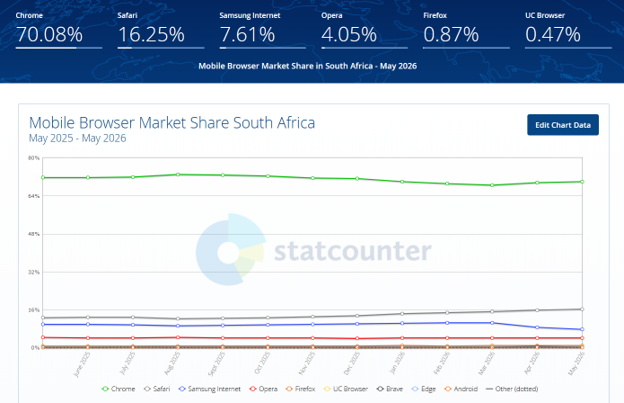
Most South African users browse, research, and enquire on mobile devices. If your landing page isn't optimised for mobile, you're losing a significant portion of your campaign audience before they have even read your headline. Forms need to be easy to complete on a small screen. CTA buttons must be large enough to tap without zooming in. Pages should load fast on mobile data connections, not just on fibre.
If you're running WhatsApp campaigns specifically, a click-to-WhatsApp button is far more effective on mobile than a standard contact form. It removes a step and connects the visitor to your business through a channel they already use and trust.
Load-Shedding & Always-On Campaigns
Paid campaigns don't pause during load-shedding. Ads keep running, emails are opened, and people click links at all hours, including when your office is dark and your team is offline.
If your website goes down or slows to a crawl because your hosting infrastructure can't handle the interruption, you're paying for campaign traffic that has nowhere to go.
Reliable hosting infrastructure keeps your landing page up and accessible, whether your office is online or not. For businesses running active campaigns, uptime isn't a nice-to-have; it's a direct factor in how much your campaign budget delivers.
Local Trust & Reassurance
South African visitors are more cautious online than many businesses expect.
A physical address, a local phone number, clear information about your service area, visible payment options, and accessible support details all reduce the hesitation that stops people from filling in a form or completing a purchase. If you need assistance setting up any of this, Domains.co.za support is available to point you in the right direction.
Don't assume that a well-designed page is enough on its own. Local credibility signals matter here in ways they may not in markets with higher baseline trust in online businesses. Show visitors that you are a real, reachable South African business, and you will convert more of them.
POPIA & Lead Capture Forms
If your landing page collects personal information, names, phone numbers, email addresses, or enquiry details, you have a responsibility to handle that data carefully. This isn't legal advice, but there are straightforward practical steps every South African business should take:
- Only ask for information you require.
- Include a short privacy notice near your form that tells visitors how their data will be used. Link it to your full privacy policy.
- Limit access to submitted data within your business to people who genuinely need it.
These steps aren't just good practice under POPIA principles. They also build the kind of trust that makes visitors more comfortable filling in your form in the first place.
Landing Page Speed & Hosting Performance
Paid and campaign traffic cost money. A slow-loading landing page wastes that budget, because visitors don't wait. If your page takes more than two seconds to load, a significant portion of your audience leaves before they've seen your offer.
Here's how you can improve your landing page's performance and speed:
Images & Video Optimisation
Large image files are one of the most common causes of slow landing pages. Compress every image before uploading it to WordPress. Where your hosting environment supports it, use modern formats like WebP, which deliver smaller file sizes without a visible drop in quality.
Avoid autoplay videos embedded directly in WordPress. If you need a video on the page, host it on YouTube or Vimeo and embed it. This keeps the heavy lifting off your server.
Plugin Bloat
Every active plugin adds something to your page load; sometimes very little, sometimes a lot. Landing page builders, form plugins, pop-up tools, live chat scripts, and tracking pixels can stack up quickly.
Before your campaign goes live, audit what's running on the page and deactivate anything that isn't doing a specific job. Fewer active scripts will mean a faster, more stable page.
Reliable Hosting Infrastructure
Fast, stable WordPress hosting in South Africa matters more during campaigns than at any other time. When an ad starts performing well and traffic spikes, your hosting needs to absorb that without slowing down or dropping connections.
Shared hosting is built for everyday traffic, not campaign spikes. When an ad starts performing, and visitors flood in at once, it can slow down or drop connections at the worst possible time. This is where VPS hosting for high-traffic campaigns assists. It provides the dedicated resources to handle spikes without affecting page speed or uptime.

SEO Considerations for WordPress Landing Pages
Not every landing page needs to rank in search. Understanding the difference between a page built for organic traffic and one built for a paid campaign changes how you approach each one.
Search-Optimised Landing Pages
Evergreen landing pages targeting a specific service, location, or solution keyword can attract consistent organic traffic over time. These pages need genuinely useful content, a proper heading structure, a clear meta title, and a well-written meta description.
A page targeting "office cleaning services Cape Town" must earn its ranking by serving that search intent properly. Thin content or keyword stuffing won't get it there.
Paid Campaign Landing Pages
Pages built specifically for paid campaigns don't always need to rank organically. The priority for these pages is message match, load speed, and conversion rate.
That said, they should still have a clear page title and meta description, if only to control how they appear when someone shares the link. More importantly, if your paid campaign page targets the same topic as an existing evergreen page on your site, add a noindex tag to the campaign page.
This tells Google not to index it, preventing a duplicate-content conflict between two pages. In WordPress, you can do this through an SEO plugin (e.g., Yoast SEO) as follows:
- Go to your individual page or post.
- Open the Yoast SEO sidebar.
- Navigate to the Advanced tab.
- Select No for Allow search engines to show this content in search results? option.
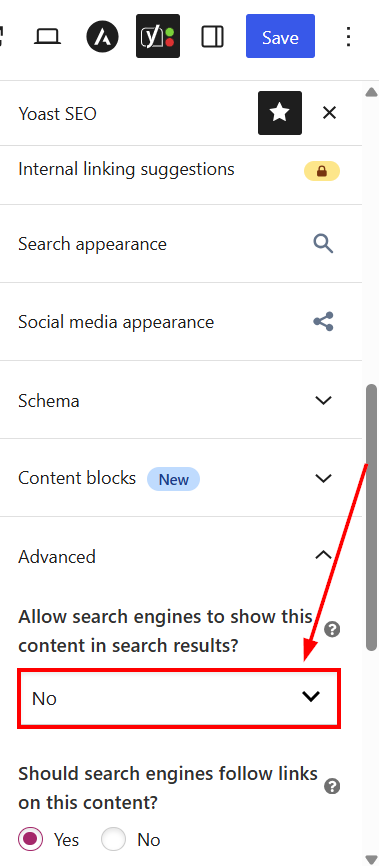
This way, the campaign page still works perfectly for your paid traffic. It just won't compete with or undermine your main organic page in search results.
Avoid Thin or Duplicate Landing Pages
A common error is creating the same landing page for multiple cities by swapping the city name and making no other changes. Search engines recognise this pattern, and it creates SEO problems rather than solving them. If you're targeting multiple locations, each page needs content that is genuinely relevant and useful to visitors in that area. That's what earns the ranking, not the city name in the URL.
Tracking Landing Page Performance
A WordPress landing page that you aren’t measuring is a page you can't improve. Set up tracking before your campaign goes live, not after.
Key Metrics to Track
- Total visits and unique visitors.
- Conversion rate: form submissions or purchases divided by total visits.
- CTA click-through rate.
- Scroll depth.
- Bounce rate or engagement rate.
- Cost per lead, where paid media is involved.
- Revenue generated, where applicable.
Tools to Use
Here are the basic tools you should use to track your landing page performance:
- Google Analytics 4 is the foundation. It tracks visits, user behaviour, and conversion events across your landing page.
- Google Search Console shows how the page performs in organic search.
- Google Tag Manager lets you set up event tracking for form submissions, CTA button clicks, phone number clicks, and WhatsApp button taps without directly editing your site's code.
- Microsoft Clarity and heatmap tools show exactly where visitors click, how far they scroll, and where they drop off.
- CRM data fills in the picture after the form is submitted, showing which leads became customers.
Common WordPress Landing Page Mistakes to Avoid
Most landing page problems aren't technical; they are strategic. These are the errors that most commonly reduce conversions:
- Too many CTAs are pulling visitors in different directions.
- A headline that doesn't match the campaign message.
- A generic offer with no specific value to the visitor.
- A form with more fields than necessary.
- Slow page speed caused by uncompressed images or too many active plugins.
- A layout that breaks or is difficult to use on mobile.
- No testimonials, reviews, or trust signals anywhere on the page.
- No privacy notice near the form.
- A broken form that doesn't submit correctly or send a notification.
- No thank-you page or confirmation after submission.
- Sending all campaign traffic to the homepage instead of a dedicated page.
- No conversion tracking in place before the campaign launches.
- Using a heavy page builder without checking its impact on load time.
Any one of these can quietly undermine a campaign that's otherwise well-targeted and well-funded.
Pre-Launch Checklist for a WordPress Landing Page
Before you send any traffic to your landing page, work through this:
- The campaign goal is clearly defined.
- Headline matches the campaign message.
- CTA is specific, and action-led.
- Form submits correctly and triggers a notification.
- Thank-you page or confirmation message works.
- Mobile layout tested on a real device.
- Page speed checked using Google PageSpeed Insights.
- GA4 or chosen tracking tool installed and tested.
- Secure your landing page with SSL.
- Privacy notice included near the form.
- All images compressed before upload.
- All links tested and confirmed working.
- Contact details are correct and visible on the page.
- Spam protection has been added to the form.
If everything on that list is confirmed, your page is ready for traffic.
When to Hire a Developer Instead of a Plugin
Plugins handle standard campaigns well, but there are situations where a plugin isn't the right tool for the job.
For example:
- If your landing page needs to connect to a CRM, a booking system, a payment gateway, or a custom internal database, a developer can build that integration properly and reliably.
- If you need a landing page template that works across multiple campaigns without being rebuilt from scratch each time, a custom code and child theme setup requires a developer for better long-term results than repeatedly adapting a plugin template.
- For high-traffic campaigns where page speed directly affects your cost per lead, a developer can optimise the build at a level that most plugins can't match. The upfront cost is higher, but for the right campaign, it pays for itself.
Final Thoughts: A WordPress Landing Page Should Be Built Around the Action You Want Users to Take
A landing page performs when every element on it serves the same goal. The headline, supporting copy, form, visuals, trust signals, and page speed all need to work together. None of them can carry the page on their own.
For South African businesses running paid, email, or WhatsApp campaigns, a well-built landing page is one of the most practical and cost-effective tools available. Pair it with web hosting for campaign websites in South Africa that can handle campaign traffic reliably and provide the foundation to turn more visitors into real enquiries, leads, and sales.
Launch faster, more reliable WordPress landing pages with Domains.co.za, built to support South African businesses with secure infrastructure, dependable performance, and practical website support.
![Strip Banner Text - Reliable WordPress hosting for South African businesses that run serious campaigns. [Learn More]](/articles/wp-content/uploads/2026/09/wordpress-wordpress-landing-page-02.webp "Reliable WordPress hosting for South African businesses that run serious campaigns. [Learn More]")
Power Up Your Site: How to Install a WordPress Plugin
VIDEO: Power Up Your Site: How to Install a WordPress Plugin
FAQS
What is a WordPress landing page?
It's a single web page built around one conversion goal, whether that's collecting leads, booking appointments, or selling a product. Unlike standard website pages, it removes distractions and gives visitors one clear action to take.
Do I need coding skills to create a landing page in WordPress?
Not necessarily. The Block Editor, Full Site Editing, and landing page plugins like SeedProd all let you build a landing page without writing a single line of code. Custom code becomes relevant when you need complex integrations or a performance-optimised build.
What's the difference between a landing page and a homepage?
A homepage introduces your business and serves multiple audiences. A landing page serves one campaign, one offer, and one audience at a time. Sending campaign traffic to your homepage almost always reduces conversions.
How long should a landing page be?
Long enough to answer the visitor's queries and remove their hesitation, but no longer. A simple quote request page can be short. A high-value product or service page may require more content, social proof, and supporting details to drive conversions.
How many CTAs should a landing page have?
One primary CTA is repeated at logical points on the page. Multiple different CTAs competing for attention split the visitor's focus and reduce conversions.
What is WordPress conversion optimisation?
This is the process of improving every element on your WordPress landing page, headline, copy, form, layout, and page speed to increase the percentage of visitors who complete the action you want them to take. It's an ongoing process driven by tracking data and testing.
Does a landing page need to be indexed by Google?
It depends on its purpose. Evergreen landing pages targeting organic search keywords should be indexed. Paid campaign pages don't always need to rank organically, but they should still have a clear meta title and description in case they are indexed.
How do I make my landing page POPIA compliant?
Only collect information you need, include a short privacy notice near your form, link to your full privacy policy, and limit internal access to submitted data. This isn't legal advice, but these steps align with responsible data handling under POPIA.
What affects landing page speed in WordPress?
Uncompressed images, too many active plugins, autoplay videos hosted directly on WordPress, and inadequate hosting infrastructure are the most common causes of slow landing pages.
When should I choose a developer instead of a plugin?
When your landing page needs custom integrations, a reusable campaign template, or a performance-optimised build that plugins cannot deliver. A well-chosen plugin is usually sufficient for standard campaigns with common goals.
Other Blogs of Interest
- A WordPress 500 Internal Server Error Can Cost You More Than a Broken Page
- WordPress Error Logs Help You Find Problems Before They Become Bigger Website Issues
- WordPress Multisite Can Simplify Multi-Website Management
- A Malware-Infected WordPress Site Can Put Your Customers, Rankings, & Business At Risk
- A Reliable WordPress Backup Can Be the Difference Between a Quick Fix and a Costly Rebuild

Rhett isn’t just a writer at Domains.co.za – he’s our resident WordPress content guru. With over 8 years of experience as a content writer, with a background in copywriting, journalism, research, and SEO, and a passion for websites.
Rhett authors informative blogs and articles that simplify the complexities of WordPress, website builders, domains, and cPanel hosting. Rhett’s clear explanations and practical tips provide valuable resources for anyone wanting to own and build a website. Just don’t ask him about coding before he’s had coffee.