


How To Register Or Transfer Your Domain Name
This blog explains how to register or transfer your domain name with Domains.co.za quickly and easily using their client portal. It covers the step-by-step process, transfer requirements, and highlights benefits like geo-redundant DNS hosting and free features included with domain transfers, helping you keep your website secure, supported, and online.
TABLE OF CONTENTS
What’s Geo-Redundancy?
If Domains.co.za is your domain name Hosting Provider of choice, you’ll be happy to learn that we make all our Domain Name Servers (DNS) geo-redundant.
Well, we know your business doesn’t have time for downtime. That’s why we boast four Domain Name Servers (DNS) hosted in various local and international geographical locations. Two are located in Johannesburg, one in Cape Town and another in London. This way geographical disruptions like power outages, will not affect your hosting.
Here are some guidance tips when registering or transferring your domain.
How to Register a Domain Name with Domains.co.za
Follow these steps to buy your WWW property:
1. Click here.
2. Search for your chosen domain name’s availability. Consider a unique TLD as a domain extension to help your business stand out!
3. Click “Add to cart” once you are happy with your choice.
4. Click “Proceed to checkout”
5. Want Whois Privacy? This will keep your domain registration information private on all domain Whois servers worldwide.
6. Select ‘On’ if required, or leave it ‘Off’.
7. Complete the purchase by paying online via one of our convenient payment gateways.
Your new domain can take up to 24 hours to become active!
How to Transfer your Domain Name to Domains.co.za
Want to transfer your domain name across to the Domains.co.za family? Follow these steps:
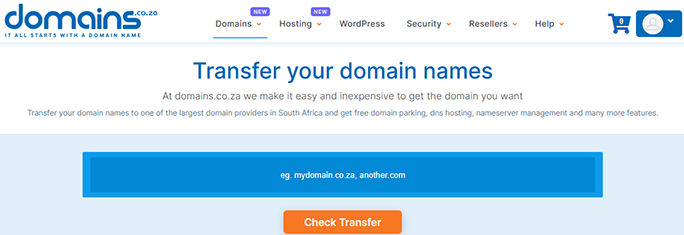
1. Click here.
2. Enter the domain name you want to transfer in the blue block, and click “Check Transfer”
3. Click “Proceed to checkout”
4. Should you require Whois Privacy to keep your registration information private, then select ‘On’ if required, or leave it ‘Off’.
Please note that local .za transfers are usually free, however international domain transfers may incur a small fee. If your current hosting provider completes their side timeously, the transfer can take up to seven days.
Requirements for Transferring a Domain
To ensure the minimum amount of downtime for your business/personal website, we require the following prior to setting up your domain on our DNS (Domain Name Servers):
- Advise your current domain name hoster that you will be transferring your domain to domains.co.za
- Provide us with the FTP details
- Send us a copy of your database (where applicable)
- Forward the Authorisation Code (if applicable)
- Unlock the Domain (if applicable)
- Kindly send us the email addresses pertaining to the domain, or that you will require.
How to Choose & Register the PERFECT Domain Name
VIDEO: How to Choose & Register the PERFECT Domain Name
Additional Features when Transferring a Domain
The following are included for FREE when you transfer your domain name to us:
- Domain Parking
- DNS Hosting
- Name Server Management
- URL Forwarding
- Social Engagement Tracking
- Domain Support
- “Ist it Up” Monitoring Tool
- Blacklist Checking
*Terms and conditions apply.
Other Blogs of Interest
- Transfer Domain Names: The What – Why – How and Where
- 7 Business Trends Your SME Can Benefit From In The Year Ahead
- Turn your Business Dreams into Reality by Registering the Right Domain Name
- 7 Reasons to Register a .joburg .durban .capetown or .africa alongside your .co.za

Chantél Venter is a creative writer, strategic thinker, and a serious gesticulator. She’s passionate about storytelling, small businesses and bringing color to the world – be it through her words or wardrobe.
She holds a four-year degree in Business and Mass Media Communication and Journalism. She’s been a copywriter and editor for the technology, insurance and architecture industries since 2007 and believes anybody can run a small business successfully. She therefore enjoys finding and sharing the best and most practical tips for this purpose.