





This guide explains how to view and configure the free SSL with Web Hosting that is included and highlights when upgrading to a paid SSL may be the better option. Many web hosting plans from Domains.co.za include a free SSL certificate, which provides essential encryption for your website at no additional cost. This free SSL protects data exchanged between your website and its visitors and enables HTTPS, allowing browsers to display the padlock icon that confirms a secure connection.
Free SSL certificates included with hosting are issued for a three-month validity period. They are automatically renewed whilst the hosting service remains active and the domain continues to point to the correct server. This automated renewal process is designed to be convenient and maintenance-free for website owners.
While automatic renewals are generally reliable, they are not entirely immune to issues. In some cases, SSL renewal may fail due to domain configuration changes, DNS updates, expired hosting services, or temporary validation errors. If an SSL certificate is not renewed successfully, visitors may see security warnings, and browsers may block access to the site until the issue is resolved.
For websites where uninterrupted security, trust, and uptime are critical, purchasing a paid SSL certificate offers greater long-term stability. Paid SSL certificates provide longer validity periods, stronger assurance, and full control over renewal timelines, reducing the risk of unexpected certificate expiry.
TABLE OF CONTENTS
How to Verify Your Free SSL Certificate
The steps to install the AutoSSL certificate in cPanel are as follows:
1. Login to your Domains.co.za account dashboard.
2. Go to the Manage Services drop-down section and choose your web hosting plan.

3. Click Manage next to your domain.
4. On the next page, click Login next to Control Panel to access cPanel.
5. Go to the Security section and select SSL/TLS Status.

6. Click on the Blue button on the right that says Run AutoSSL.
Purchasing & Installing A New SSL Certificate
1. Login to your Domains.co.za account dashboard.
2. Go to the Manage Services drop-down section and click SSL Certificates.
3. If you require another, click Add SSL Certificate.
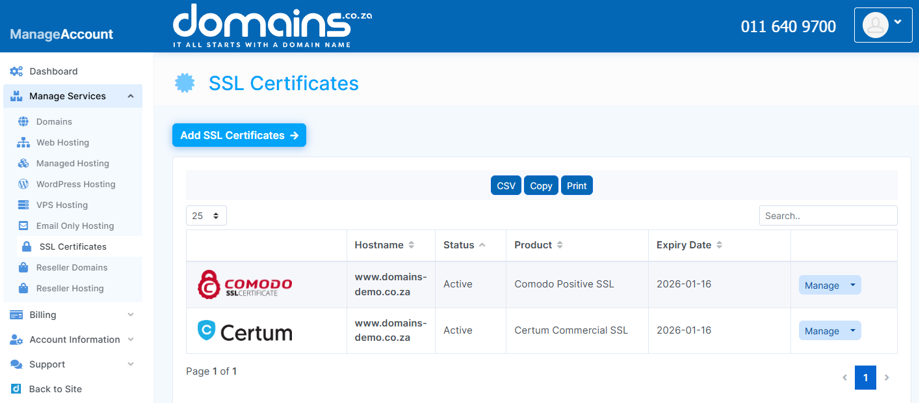
4. Choose your plan, and the system will automatically generate and install the SSL certificate for your domain.
Once installed, your site will be accessible via https:// and the padlock icon will appear in the browser.
Additional Information
- The free SSL certificate included with your hosting plan is valid for three months and is automatically renewed to maintain ongoing website security.
- Automatic SSL renewals depend on correct domain and DNS configuration, which means changes to nameservers or hosting settings can sometimes interrupt the renewal process.
- If an SSL certificate expires unexpectedly, browsers may display security warnings or block access to the website, which can negatively impact visitor trust and search engine rankings.
- Paid SSL certificates typically offer longer validity periods and predictable renewal schedules, reducing the risk of unexpected expiry and providing uninterrupted security.
- For business websites, online stores, and high-traffic platforms, purchasing an SSL certificate is the recommended option to ensure consistent protection, enhanced trust, and complete peace of mind.
- Domains.co.za offers a range of SSL certificate options and support to help you secure your website reliably and professionally.
Login to Domains.co.za Account
1. Go to the Domains.co.za website Account Login page.

2. Enter your Email and Password and click the Sign In button.
3. You will see the Domains.co.za Dashboard, displaying the Manage Account menu on the left and your Account Information, Account Overview and Open Support Tickets on the right.


