





The Domains.co.za Link in Bio tool lets you consolidate your brand, content, offers and social platforms into one simple, memorable domain name.
Instead of using a generic link service, you can build a professional, branded, SEO-friendly mini website powered by your domain. This guide explains what Link in Bio is, how it works, and who benefits most from using it.
TABLE OF CONTENTS
What is Link in Bio?
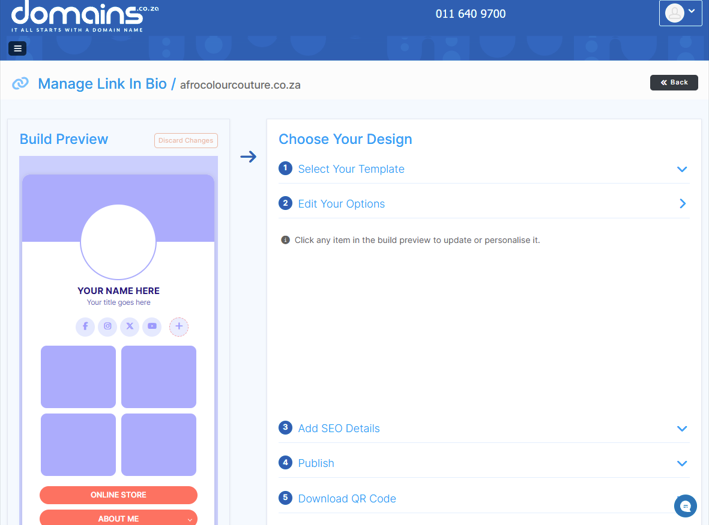
It is Domains.co.za’s affordable, easy-to-use add-on that allows you to build a customised one-page website.
It includes:
- A branded domain name link.
- Three customisable templates.
- Colour adjustments.
- Social links.
- Buttons and expandable content blocks.
- A logo or profile image.
- Built-in SEO fields.
- Free SSL.
- Local support.
No hosting. No coding. No fuss. Your audience clicks one link, your domain, and immediately sees your offers, socials, products, portfolio or services.
Who Should Use Link in Bio?
Virtually anyone who needs a single place to display key links can benefit.
This includes:
- Influencers & Content Creators: Ideal for centralising YouTube videos, TikTok links, affiliate links, playlists and campaigns.
- Small Business Owners & Entrepreneurs: Share your store, services, contact details and promotions instantly.
- Startups & Solopreneurs: Build a simple one-page website that doesn’t require hosting. Perfect for tight budgets.
- Freelancers & Professionals: Showcase portfolios, CVs, booking links, contact info and certifications.
- Sports Teams & Athletes: Promote fixtures, highlights, merchandise and results.
- Community Groups & Organisations: Share sign-up forms, meeting times and updates.
- Schools & Universities: Provide quick access to resources, notices, and enrolment info.
- Non-profits & Charities: Highlight donations, campaigns and volunteer opportunities.
- Musicians & Artists: Share new releases, past performances, gallery work and ticket sales.
- Event Organisers: Create one page with ticket links, event details and schedules.
Why Choose Domains.co.za’s Link in Bio?
- No hosting required.
- Flexible and customizable.
- SEO-enabled for better Google visibility.
- Backed by Local Support
Additional Information
- To use Link in Bio, you must have an active domain registered with Domains.co.za, which allows you to create a branded and memorable URL.
- Setting up the Link in Bio page is quick. Register a domain, add the tool, complete payment, choose from three templates, and customise your page.
- The page can be personalised with your preferred colours, fonts, and visual elements such as a profile picture or logo, helping you maintain brand consistency.
- It is designed to work seamlessly across all major platforms, including Instagram, TikTok, YouTube, WhatsApp, Facebook, and any service that allows a bio link.
Login to Domains.co.za Account
1. Go to the Domains.co.za website Account Login page.

2. Enter your Email and Password and click the Sign In button.
3. You will see the Domains.co.za Dashboard, displaying the Manage Account menu on the left and your Account Information, Account Overview and Open Support Tickets on the right.


