


Keeping your account login and information updated ensures smooth communication, accurate billing, and uninterrupted service.
Whether you need to update your billing details, company information, or email address, Domains.co.za makes it simple to manage your profile from a single central location. Maintaining accurate account information also helps prevent delays in support requests and service notifications.
TABLE OF CONTENTS
How to Update Your Account Information
1. Login to your Domains.co.za Customer Portal.
2. Navigate to Account Information.
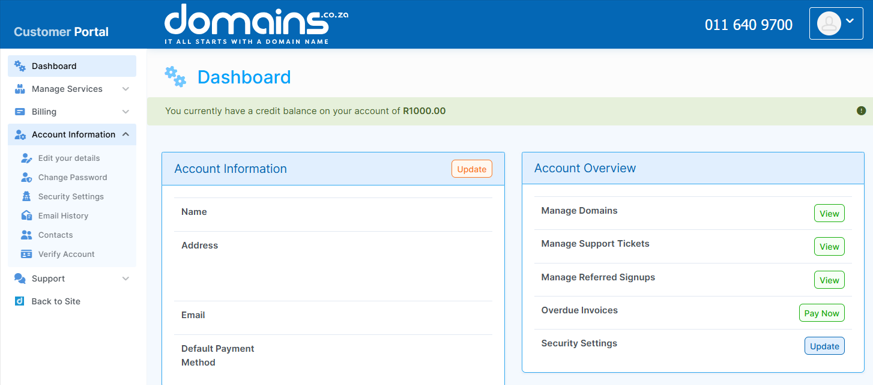
3. Click Edit your Details within your profile details.
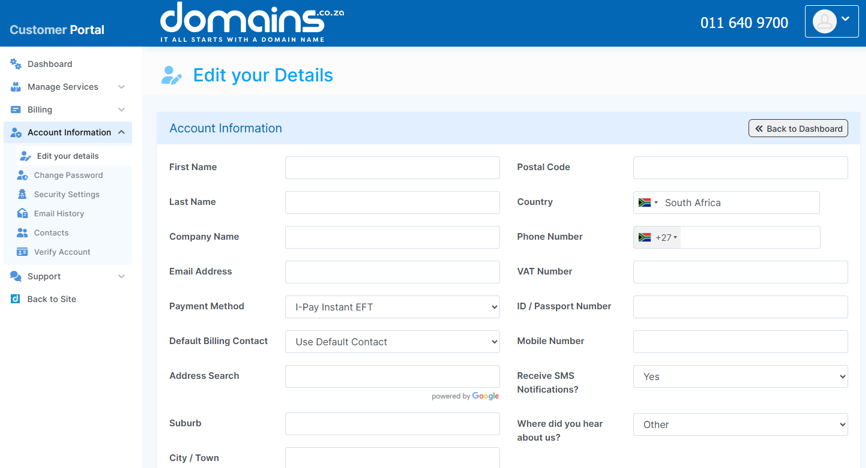
4. Edit the relevant fields with your updated information.
5. Review all changes to ensure accuracy.
6. Click Save Changes to apply the updates.
Additional Information
- Regularly updating your email address ensures you receive important notifications and billing alerts.
- Accurate contact details help support teams assist you more efficiently.
- Updating company information is important for invoicing and compliance purposes.
- Changes to account details are applied immediately after saving.
- Constantly reviewing your information helps prevent outdated or incorrect records.
- Only authorised users should have access to update account details.
- You can return to this section at any time to make further updates.
Login to Domains.co.za Account
1. Go to the Domains.co.za website Account Login page.

2. Enter your Email and Password and click the Sign In button.
3. You will see the Domains.co.za Dashboard, displaying the Manage Account menu on the left and your Account Information, Account Overview and Open Support Tickets on the right.


