





Manage your invoices is an important part of maintaining your Domains.co.za services. Login to your Customer Portal account to access a convenient way to view, download, and manage all your invoices in one place.
Whether you need to setup a new credit card, download statements, or settle outstanding balances, the billing section makes the process simple and efficient.
TABLE OF CONTENTS
How to Manage Invoices
1. Login to your Domains.co.za Customer Portal.
2. Navigate to Billing in the dashboard.
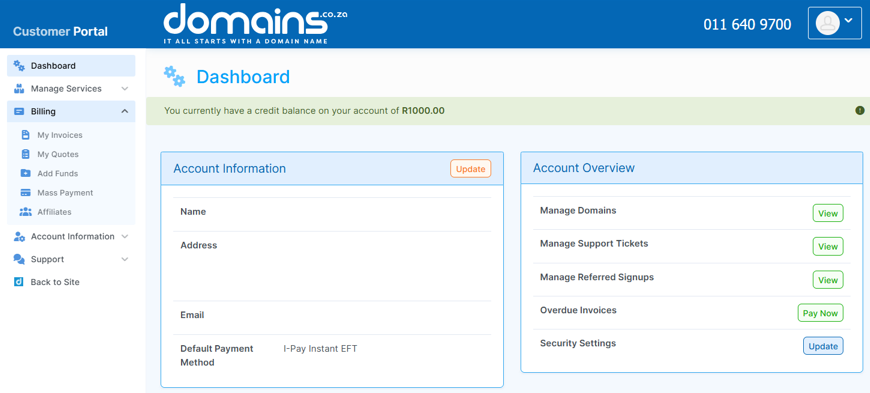
3. Click My Invoices to open your invoice list.
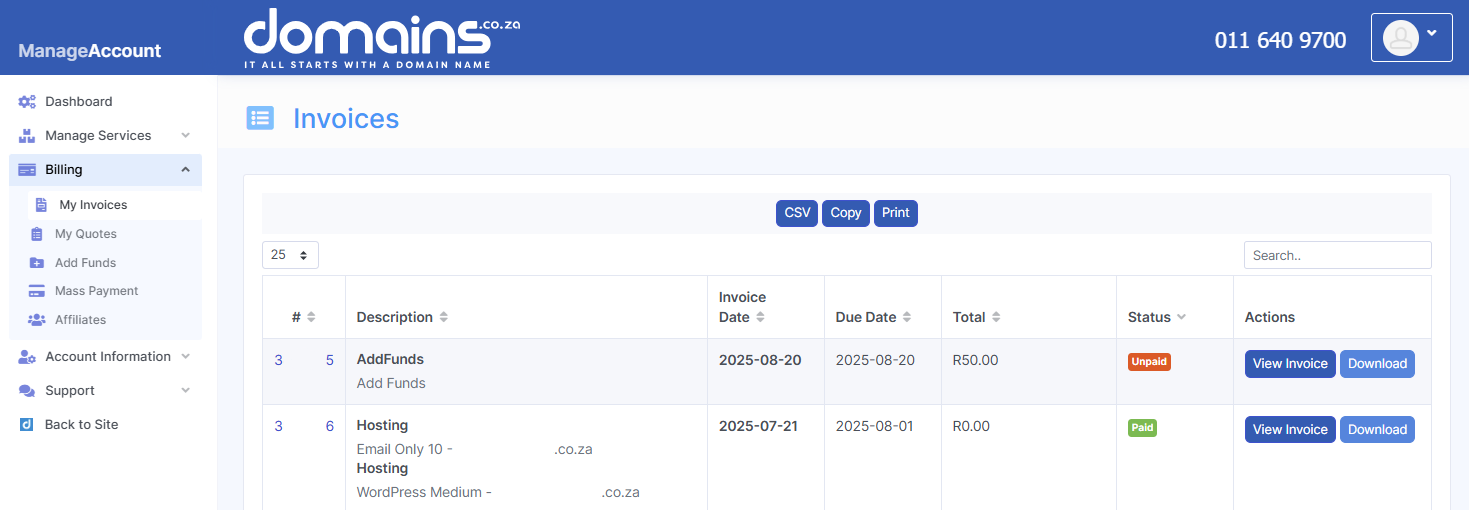
4. Browse through your current and past invoices.
5. Select an invoice to view detailed information.
6. Download or print invoices as required.
7. Proceed with payment if an invoice is outstanding.
Additional Information
- You can view your current account balance directly from the dashboard.
- If not paid on time, overdue invoices may result in service suspension.
- Exporting invoices can assist with financial tracking and accounting.
- Payments are typically allocated to the oldest outstanding invoice first.
- Always use the correct payment reference to avoid delays.
- Multiple payment methods may be available, depending on your account.
- Support is available if you experience issues with billing or payments.
Login to Domains.co.za Account
1. Go to the Domains.co.za website Account Login page.

2. Enter your Email and Password and click the Sign In button.
3. You will see the Domains.co.za Dashboard, displaying the Manage Account menu on the left and your Account Information, Account Overview and Open Support Tickets on the right.


