


Domains.co.za provides a simple process to reset your password, ensuring you can regain access quickly and securely when necessary.
Keeping your account password secure and updated is essential to protect your Domains.co.za account login and services. Whether you suspect unauthorised access or simply wish to improve your security, changing your password regularly is highly recommended.
TABLE OF CONTENTS
How To Reset Your Password
1. Login to your Domains.co.za Customer Portal.
2. Navigate to Account Information.
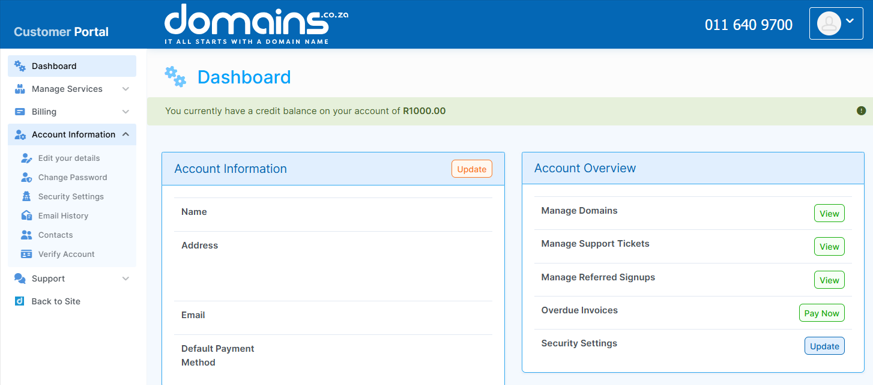
3. Select Change Password from the dropdown menu.
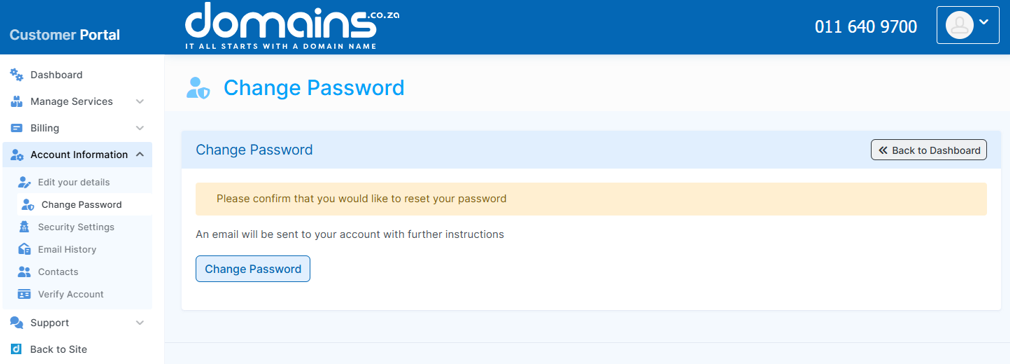
4. Click the password reset option.
5. Check your registered email address for the reset link.
6. Follow the instructions in the email to create a new password.
7. Save your changes and login using your updated credentials.
Additional Information
- For security purposes, password reset instructions are sent to your registered email address.
- Always check your spam or junk folder if you do not receive the reset email.
- Choose a strong password that includes a combination of letters, numbers, and special characters.
- Avoid using easily guessed information such as names or birthdates.
- To reduce security risks, do not reuse passwords across multiple accounts.
- Regular password updates help protect your account from unauthorised access.
- If you experience issues, you can contact support for assistance.
Login to Domains.co.za Account
1. Go to the Domains.co.za website Account Login page.

2. Enter your Email and Password and click the Sign In button.
3. You will see the Domains.co.za Dashboard, displaying the Manage Account menu on the left and your Account Information, Account Overview and Open Support Tickets on the right.


