


This guide explains the common causes of downtime during a website migration, how long propagation can take, and the steps you must take to reduce service interruptions when moving your hosting services to Domains.co.za.
Migrating your website to a new web hosting provider can seem like a major task, especially when you are concerned about website downtime and ensuring visitors can still access your site during the move. At Domains.co.za, every effort is made to keep downtime to a minimum when transferring your website and services.
The amount of downtime experienced during a migration depends on several factors, including how your DNS records are configured, the size of your website, email usage, and how quickly DNS changes propagate across the internet. In many cases, websites experience little to no noticeable downtime when the migration is performed correctly.
TABLE OF CONTENTS
How to Prepare for a Website Migration to Domains.co.za
1. Login to the Domains.co.za Customer Portal using your account credentials.
2. Open the Manage Services dropdown menu from the main dashboard navigation.
3. Select Web Hosting from the available service options.
4. Locate the hosting package linked to your domain name and click Manage.
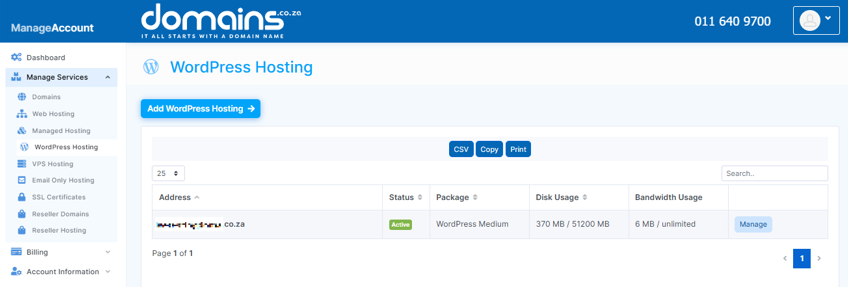
5. Click Login next to Control Panel to access cPanel.

6. Review your existing website files, databases, email accounts, and DNS settings before beginning the migration.
7. Create a full backup of your website and databases to ensure you can restore your data if needed.
8. Lower your DNS TTL (Time to Live) settings before migration, if possible, to help speed up DNS propagation.
9. Upload or migrate your website data to your new Domains.co.za hosting account
10. Update your domain’s DNS records to point to the new hosting server once the migration is complete.
What Happens When You Migrate a Website?
When a website is moved to a new hosting provider, the website files, databases, emails, and DNS settings must all point to the new hosting server. DNS propagation is usually the main reason for temporary interruptions.
DNS propagation refers to the time it takes for Internet service providers and devices around the world to update their records with your new hosting server details. During this period, some visitors may still be directed to the old server while others will reach the new server.
In most situations:
- Website downtime is minimal or avoided completely.
- DNS propagation can take anywhere from a few minutes to 24 to 48 hours.
- Emails may temporarily route to the old or new server during propagation.
- Proper planning can significantly reduce interruptions.
Additional Information
- DNS propagation normally completes within 24 hours, although some internet providers may take up to 48 hours to fully refresh their records.
- Many websites experience no visible downtime because the old hosting account remains active during propagation.
- Large websites with extensive databases or media files may take longer to transfer between servers.
- Email services can be temporarily affected during DNS propagation if MX records are updated simultaneously.
- Reducing the DNS TTL value before migration can help minimise propagation delays.
- It is recommended to avoid making website changes during the migration period to prevent data mismatches.
- Testing your website on the new server before changing DNS records can help identify issues early.
- Keeping your old hosting account active for at least 48 hours after migration is strongly recommended.
Login to Domains.co.za Account
1. Go to the Domains.co.za website Account Login page.

2. Enter your Email and Password and click the Sign In button.
3. You will see the Domains.co.za Dashboard, displaying the Manage Account menu on the left and your Account Information, Account Overview and Open Support Tickets on the right.


