


This guide explains what each of these record types is used and how to add CNAME, AAAA, CAA And SRV records or update them using the Zone Editor in cPanel.
DNS (Domain Name System) records control how your domain connects to websites, email services, and other online applications. While A and MX records are among the most commonly used DNS records, there are several other record types that play an important role in configuring modern services.
CNAME, AAAA, CAA, and SRV records are commonly used to point subdomains to other hostnames, enable IPv6 connectivity, specify which Certificate Authorities can issue SSL certificates for your domain, and configure services such as Microsoft 365, VoIP, and instant messaging platforms.
Each DNS record serves a different purpose:
- CNAME (Canonical Name): Points one hostname to another hostname instead of an IP address.
- AAAA: Maps a hostname to an IPv6 address.
- CAA (Certification Authority Authorisation): Specifies which Certificate Authorities are permitted to issue SSL/TLS certificates for your domain.
- SRV (Service): Defines the location of specific services, including the hostname and port number clients should connect to.
Before making changes to your DNS records, ensure you have the correct values provided by your hosting provider or third-party service. Incorrect DNS records can affect website availability, email delivery, and other online services.
TABLE OF CONTENTS
How to Add a DNS Record
1. Login to the Domains.co.za Customer Portal.
2. Open the Manage Services drop-down menu and select Web Hosting.
4. Click Manage next to the hosting package for your domain.

5. Click Login next to Control Panel to access cPanel.
6. Open Zone Editor.
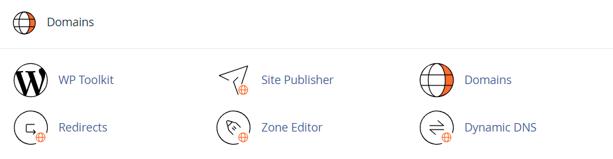
7. Locate the domain you wish to manage and click Manage.
8. Click Add Record or select the appropriate record type, depending on your version of cPanel.
9. Select the required DNS record type and enter the information provided by your hosting provider or third-party service.
10. Review the details carefully to ensure the hostname, destination and any other required values are correct.
11. Click Save Record to apply your changes.
NOTE:
DNS changes may take up to 24–48 hours to fully propagate across the internet, although updates are often visible much sooner.
Add CNAME Record
Use a CNAME record when you want one hostname to point to another hostname instead of directly to an IP address.
Examples include:
- Pointing www to your root domain.
- Verifying domain ownership with third-party services.
- Connecting subdomains to cloud-based applications.
- When creating a CNAME record, you will typically need:
- The hostname or alias.
- The destination hostname.
- The TTL (Time to Live), if required.
Adding an AAAA Record
Use an AAAA record to point a hostname to an IPv6 address.
This record functions similarly to an A record but supports IPv6 networking.
When creating an AAAA record, you will typically need:
- The hostname.
- The IPv6 address.
- The TTL value, if required.
Adding a CAA Record
A CAA record tells Certificate Authorities which organisations are authorised to issue SSL/TLS certificates for your domain.
Adding a CAA record can improve your domain’s security by helping to prevent unauthorised certificate issuance.
When creating a CAA record, you will typically need:
- The hostname.
- The policy tag (such as issue or issuewild).
- The authorised Certificate Authority.
- The TTL value, if required.
Adding an SRV Record
An SRV record specifies where a particular service can be found on your domain.
These records are commonly used for:
- Microsoft 365 services.
- SIP and VoIP systems.
- Instant messaging platforms.
- Active Directory services.
When creating an SRV record, you will generally need:
- The service name.
- The protocol.
- The priority.
- The weight.
- The port number.
- The target hostname.
- The TTL value, if required.
Additional Information
- Always verify the DNS values provided by your service provider before creating or updating DNS records.
- Incorrect DNS settings can interrupt website access, email delivery, or connected services.
- A CNAME record cannot exist alongside other record types using the same hostname.
- AAAA records are only required if the destination service supports IPv6 connectivity.
- CAA records help improve SSL certificate security but should only be configured using information supplied by your Certificate Authority.
- SRV records often contain several required fields, so ensure all values are entered exactly as provided.
- After updating DNS records, allow sufficient time for DNS propagation before testing the changes.
- If you are unsure which DNS record type to use, contact the Domains.co.za Support team before making changes.
Login to Domains.co.za Account
1. Go to the Domains.co.za website Account Login page.

2. Enter your Email and Password and click the Sign In button.
3. You will see the Domains.co.za Dashboard, displaying the Manage Account menu on the left and your Account Information, Account Overview and Open Support Tickets on the right.


