Domains.co.za
  • Domains
    Register Domains
    Register your perfect domain today.
    It’s quick and easy.
    AI Domain Name Generator AI Domain Name Generator
    Create your perfect Domain Name today.
    Transfer Domains
    Transfer your domains to us in a few easy steps.
    Whois Search
    View the whois information on a domain name.
    Bulk Domain Registrations
    Register and check the availability of multiple domains at once.
    Bulk Domain Transfer
    Move multiple domains to us quickly and easily.
    Domain Protection
    Protect your personal information.
  • Hosting
    cPanel Hosting Web Hosting
    cPanel Web Hosting From R109/mo
    WordPress Hosting
    Experience the best in WordPress Hosting
    Email Only Hosting
    Easy setup, automated updates & backups
    Site Builder Site Builder
    Create your stunning website, it's fast and easy
  • VPS
    Linux VPS Hosting
    UltraFast  VPS Hosting From R209/mo
    Windows VPS Hosting
    UltraFast  VPS Hosting From R1139/mo
    Managed cPanel Hosting Managed cPanel Hosting
    Managed cPanel Virtual Machines From R2999/mo
    Self-Hosted n8n VPS Self-Hosted n8n VPS
    Unlimited Workflow Automation From R319/mo
  • Security
    Domain Validated SSL
    Domain Validated SSL Certificates
    Organization Validated SSL
    Organization Validated SSL Certificates
  • Resellers
    Domain Reseller
    Resell Domains on our platform From R89 per domain
    Web Hosting Reseller
    Reseller Web Hosting on SSD Hosting Servers From R419/mo
  • Help
    Open a Ticket
    Log a support or billing enquiry with one of our departments.
    011 640 9700
    Need Help? Give us a call
    About Us
    Information about Domains.co.za
    Knowledgebase
    Check out our extensive Knowledge Base for help
    Network Status
    Just to check everything is hunky dory
    Accreditations
    View the organisations and registries we are accredited with
    Blog
    View insights into the latest scoops
    Articles & Tutorials Articles & Tutorials
    Practical guides and insights to help you succeed
  • Checkout
011 640 9700
Contact Support
Sign In

How To Setup An Email On Samsung Devices

< All Topics
  1. Main
  2. Email
  3. How To Setup An Email On Samsung Devices
Summarize with:
ChatGPT
Claude
Perplexity

Here is how to setup your email on Samsung smartphone or tablet lets you manage your emails anywhere from your mobile device.

This guide shows you how to add an email account using the native Samsung Email app.

Before you begin, ensure you have the Samsung Email app, which should appear on your device by default. If not, you can download it from the Galaxy Store or Google Play Store if it’s not already installed.

TABLE OF CONTENTS

  • How to Setup Email on Samsung Devices
    • Access Email On Samsung Settings
    • Select and Login to Your Email Account
    • Adjust Preferences and Complete Setup
    • How to Buy Email Hosting in South Africa
  • Additional Information
    • Managing Multiple Email Account
    • Troubleshooting Email On Samsung
    • Customising Your Email Experience
    • Enhancing Security & Backup
    • General Email Account Tips

How to Setup Email on Samsung Devices

Access Email On Samsung Settings

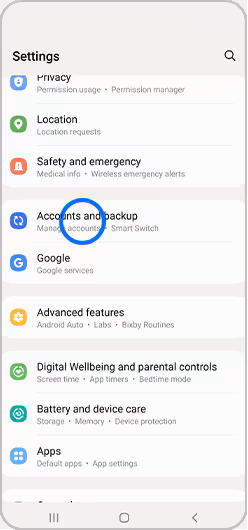
1. Open Settings.

2. Select Accounts and Backup.
How To Setup An Email Account On Samsung Devices

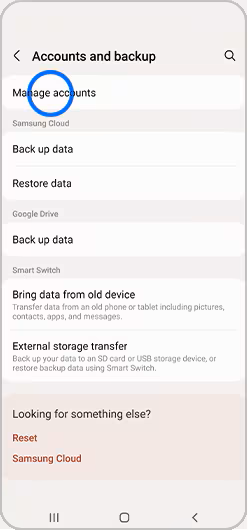
3. Choose Manage Accounts to view a list of accounts currently set up on your device.
How To Setup An Email Account On Samsung Devices

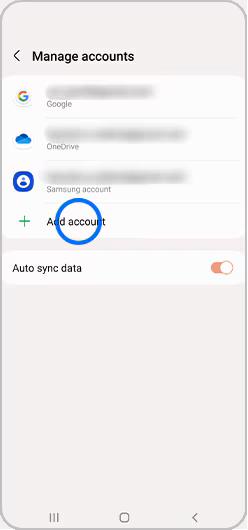
4. Click + Add Account to begin the process of adding your email account.
How To Setup An Email Account On Samsung Devices

Select and Login to Your Email Account

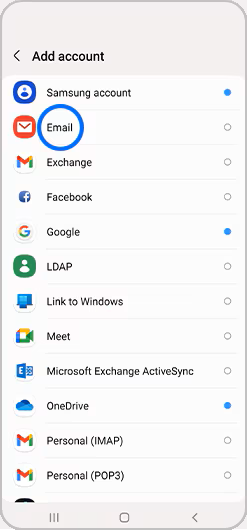
5. Select Email from the list of options presented.
How To Setup An Email Account On Samsung Devices

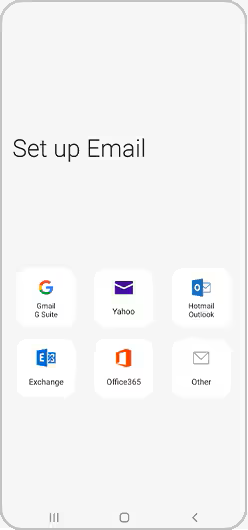
6. You will see a list of different email providers. Choose the one you want to set up (e.g., Gmail, Yahoo, etc.).
How To Setup An Email Account On Samsung Devices

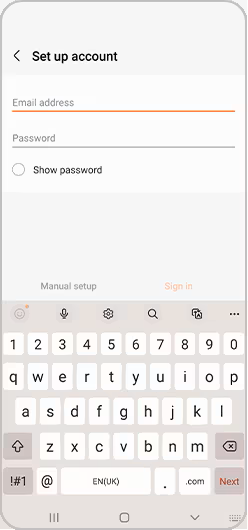
7. Input your email address and password in the provided fields, then click Sign In or follow any additional on-screen instructions.
How To Setup An Email Account On Samsung Devices

Adjust Preferences and Complete Setup

8. Review and confirm your preferences regarding notifications and settings.

9. Here, you can choose how often to sync your emails and whether you want notifications for new messages.

10. Once you’ve confirmed your preferences, your email account should now be set up and ready for use. You can access it through the Samsung Email app or any other email app you prefer.

How to Buy Email Hosting in South Africa

VIDEO: How to Buy Email Hosting in South Africa – Domains.co.za Step-by-step Guide

Additional Information

Setting up your email on a Samsung device enhances communication and keeps you organised. Here are some additional tips:

Managing Multiple Email Account

You can add multiple email accounts by repeating the setup steps for each account you wish to configure.

Adjust the sync settings for each account individually to match your preferences. This ensures that each account syncs according to your preferences.

Troubleshooting Email On Samsung

If you encounter issues during setup, double-check your email address and password for accuracy, and ensure your internet connection is stable. Additionally, verify that your email server settings are correct, especially if you’re using a custom domain.

Customising Your Email Experience

If you prefer a different email application (like Outlook), download it from the Google Play Store and follow similar setup steps. Many email apps offer unique features that may better suit your needs.

Use folders and labels to keep your inbox organised. Most email apps allow you to create custom folders and labels to categorise your emails effectively.

Customise your notification settings to ensure you receive alerts for important emails. You can adjust the frequency and type of notifications for each account.

Enhancing Security & Backup

Enable two-factor authentication (2FA) for added security. This provides an extra layer of protection for your email accounts.

Regularly backup your email settings and data. This can be done through your Samsung device’s settings or via your email app’s backup options. In case of device issues, you can easily restore your email configurations.

General Email Account Tips

Add email widgets to your home screen for quick access to your inbox. Widgets can provide a snapshot of your latest emails so you can manage your inbox more efficiently.

Views1244
Previous How To Setup An Email Autoresponder In cPanel
Next How to Setup an Email Signature – Outlook 2010 *Not supported*
[post-views]

Categories

  • Home
  • 23 Billing
  • 69 Domains
  • 126 Email
  • 16 ESET
  • 41 General
  • 197 Hosting
  • 3 Integrations
  • 3 Link In Bio
  • 3 n8n VPS Hosting
  • 6 Pre-Sales
  • 21 Registrars
  • 21 Resellers
  • 59 Site Builder
  • 65 SSLs
  • 5 VPS Hosting
  • 85 WordPress
Domains.co.za - Web Hosting
Domains.co.za - Site Builder Add-on
Domains.co.za - WordPress Hosting
Domains.co.za - AI Domain Name Generator
Domains.co.za

We are a domain name and website hosting provider committed to offering affordable web hosting solutions that enable businesses to establish a strong online presence.

Secure Payment Gateways

Peach Logo DPO Logo PayFast Logo Visa Logo Mastercard Logo Netcash Logo Ozow Logo

Read more about our secure payments.

Hosting

  • WordPress Hosting
  • Web Hosting
  • Managed cPanel Hosting
  • Email Hosting
  • Linux VPS Hosting
  • Windows VPS Hosting
  • Site Builder
  • PHP Extended Support
  • Self-Hosted n8n VPS

Domains

  • Register Domains
  • Transfer Domains
  • WHOIS Search
  • Bulk Domain Registrations
  • Bulk Domain Transfers
  • Domain Protection

Security

  • Domain Validated SSLs
  • Organization Validated SSLs

Resellers

  • Reseller Web Hosting
  • Domain Reseller
  • Registrar Services
  • Integration
  • Domain Reseller Login

Legal

  • Terms and Conditions
  • UDRP
  • Our SLA
  • Abuse Policy
  • Disclosure Requests

Our Company

  • About Us
  • Contact Us
  • Accreditations
  • Careers

Help

  • System Status
  • Affiliate Program
  • Knowledgebase
  • Blog
  • Report Abuse
Facebook Instagram YouTube Twitter LinkedIn Google Business
Copyright © 2026 Domains.co.za. All Rights Reserved.