


This guide explains what a WordPress landing page is, how it differs from a regular website page, and the different methods you can use to create one.
WordPress landing pages are the most effective tools for transforming website visitors into leads, enquiries, bookings, sign-ups, or sales. Unlike a standard website page that may contain multiple navigation options and various pieces of information, a landing page is designed with a single goal in mind. Whether you are promoting a service, collecting quote requests, encouraging newsletter sign-ups, advertising an event, or launching a special offer, a well-designed landing page can help focus visitors on taking a specific action.
WordPress provides several ways to create landing pages, making it suitable for beginners and advanced users alike. You can build a landing page using the WordPress Block Editor, a landing page plugin, built-in theme options, or custom code. The best method depends on your website, your technical experience, and the level of customisation you require.
TABLE OF CONTENTS
What Is a WordPress Landing Page?
A WordPress landing page is a standalone page designed around a single conversion goal.
Common landing page goals include:
- Lead generation.
- Newsletter sign-ups.
- Product promotions.
- Service enquiries.
- Online bookings.
- eBook or guide downloads.
- Event registrations.
- eCommerce promotions.
A successful landing page guides visitors towards one specific action rather than presenting multiple options.
Landing Page vs Regular Website Page
A regular website page often includes:
- Full website navigation.
- Multiple links.
- General business information.
- Several topics or objectives.
A landing page is different because it:
- Focuses on one offer or campaign.
- Reduces unnecessary distractions.
- Highlights one call to action.
- Encourages visitors to complete a specific goal.
This focused approach helps create a clearer path for visitors.
Before You Begin
Before building your landing page, ensure you have:
- Access to your WordPress dashboard.
- A clearly defined goal.
- A target audience.
- An offer or campaign message.
- Call-to-action wording.
- Relevant images or videos.
- Form requirements.
- A tracking strategy.
- A mobile-first design approach.
Planning these elements in advance can make the page creation process much easier.
Key Elements Every Landing Page Should Include
- Clear Headline: Your headline should immediately communicate the value of your offer and explain why visitors should continue reading.
- Supporting Copy: Supporting content should explain the benefits of your product, service, offer, or promotion in a concise and easy-to-read format.
- Strong Call to Action: A call-to-action (CTA) should clearly tell visitors what to do next, such as:
- Request a quote.
- Book a consultation.
- Download a guide.Register now.
- Contact us.
- Relevant Visuals: Images, screenshots, videos, or product photographs can help reinforce your message and build trust.
- Lead Form or Conversion Action: Forms should request only the information necessary to complete the conversion goal.
- Trust Signals:
- Examples include:
- Customer testimonials.
- Client logos.
- Reviews.Certifications.Guarantees.
- Secure payment indicators.
Choose the Best Method for Your WordPress Landing Page
WordPress offers several ways to create landing pages:
| Method | Best For |
| Block Editor / Full Site Editing | Beginners and standard landing pages |
| Landing Page Plugins | Campaign-focused pages and templates |
| Theme Layout Options | Users whose theme includes landing page features |
| Custom Code | Developers and advanced customisation |
Method 1: Create a Landing Page with the WordPress Block Editor
The Block Editor is one of the simplest ways to create a landing page.
1. Login to the Domains.co.za Customer Portal using your account credentials.
2. Navigate to Manage Services from the dropdown menu.
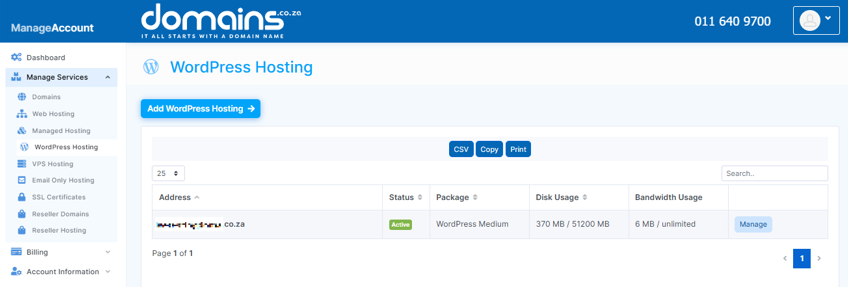
3. Select your WordPress Hosting package and click Manage.
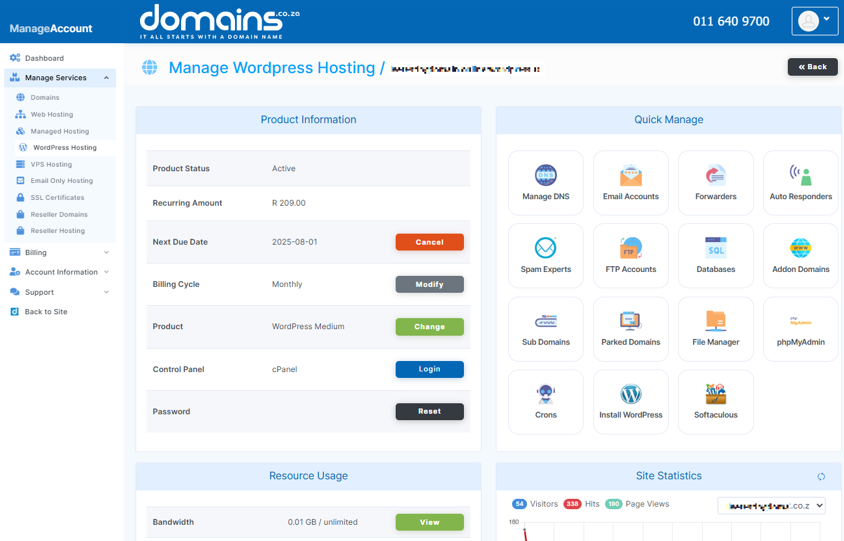
4. Click Login to cPanel to access your hosting control panel.
5. Launch WordPress and navigate to Appearance > Editor if your theme supports Full Site Editing.
6. Choose a blank template or create a new landing page template designed to minimise distractions. Ensure you include:
- Hero section.
- Benefits.
- Offer details.
- Images or videos.
- Contact form.
- CTA buttons.
- Trust signals.
7. Block patterns can help speed up layout creation and maintain consistent design elements.
8. Preview the page on desktop and mobile devices before publishing.
Method 2: Create a Landing Page with a Plugin
Landing page plugins often include drag-and-drop builders and ready-made templates.
1. Login to the Domains.co.za Customer Portal using your account credentials.
2. Navigate to Manage Services from the dropdown menu.
3. Select your WordPress Hosting package and click Manage.
4. Click Login to cPanel to access your hosting control panel.
5. Open your WordPress Dashboard and navigate to Plugins > Add New Plugin.
Examples include:
- SeedProd.
- Elementor.
- Beaver Builder.
- Spectra.
6. Always review plugin compatibility, ratings, and update history before installation.
7. Install and activate your chosen plugin.
8. Choose a template that closely matches your campaign goals.
9. Replace placeholder content with your own:
- Headline.
- Images.
- CTA buttons.
- Contact forms.
- Business information.
10. Test forms, buttons, and tracking before publishing.
Method 3: Create a Landing Page with Your WordPress Theme
Some WordPress themes include built-in landing page functionality.
1. Login to the Domains.co.za Customer Portal using your account credentials.
2. Navigate to Manage Services from the dropdown menu.
3. Select your WordPress Hosting package and click Manage.
4. Click Login to cPanel to access your hosting control panel.
5. Navigate to Pages > Add New Page in WordPress.
6. Where supported by your theme, remove unnecessary sidebars, banners, and navigation elements.
7. Build the page using headings, images, text, forms, and CTA buttons.
8. Confirm that all links, forms, and conversion actions function correctly before publishing.
Method 4: Create a Custom Landing Page with Code
This method is recommended for developers or users working with a web developer.
1. A child theme protects your customisations when the main theme is updated.
2. Develop a dedicated template file for your landing page.
3. Use CSS, PHP, and supporting scripts to create the desired design and functionality.
4. Select the custom template within the WordPress page settings.
What to Check Before Sending Traffic to Your Landing Page
Before promoting your landing page, verify that:
- CTA buttons work correctly.
- Forms are successfully submitted.
- Confirmation messages appear.
- Thank-you pages load correctly.
- Mobile layouts display properly.
- The page loads quickly.
- Tracking tools are installed.
- Contact information is accurate.
- Privacy notices are visible when you collect personal information.
Troubleshooting Common Landing Page Issues
- Missing Templates: Some themes do not include landing page templates. Consider using a plugin or creating a custom template.
- Broken Forms: Check plugin settings, email routing, and form integrations.
- Slow Loading Speeds: Compress images, reduce large video files, and remove unnecessary plugins.
- Plugin Conflicts: Temporarily disable plugins to identify compatibility issues.
- Mobile Display Problems: Test your page on different devices and screen sizes.
- Weak Calls to Action: Ensure your CTA is clear, visible, and aligned with the page goal.
- Tracking Issues: Verify that analytics and conversion tracking codes have been installed correctly.
Additional Information
- Landing pages perform best when focused on a single goal and call to action.
- Customising templates is important because generic placeholder content rarely delivers strong results.
- Mobile responsiveness should always be prioritised, because many visitors access websites using smartphones.
- Large images and videos should be optimised to improve loading speeds and user experience.
- Contact forms should request only the necessary information to complete the intended action.
- Regular testing can help identify opportunities to improve conversion rates over time.
- Tracking tools such as analytics platforms can help measure the success of your landing page campaigns.
- If you collect personal information, ensure that visitors are informed about how their data will be used.
- Reliable hosting can contribute to faster loading times and improved visitor experience.
You’re All Set
Creating a WordPress landing page does not require advanced technical knowledge. By choosing the correct creation method, focusing on a single goal, and including strong calls to action, you can build a landing page that supports your marketing objectives and provides a better experience for visitors.
After publishing your landing page, continue monitoring its performance and refine the headline, copy, visuals, forms, and calls to action based on real user behaviour and campaign results.
Login to Domains.co.za Account
1. Go to the Domains.co.za website Account Login page.

2. Enter your Email and Password and click the Sign In button.
3. You will see the Domains.co.za Dashboard, displaying the Manage Account menu on the left and your Account Information, Account Overview and Open Support Tickets on the right.


