


When comparing Windows VPS Hosting packages from Domains.co.za, it is important to understand how each plan scales in CPU power, memory, storage, and overall performance.
If you’re deciding between the Epyc VPS 3 vs VPS 4 packages, this guide explains the key differences so you can choose the best hosting option that supports your current workload and gives you room to grow.
TABLE OF CONTENTS
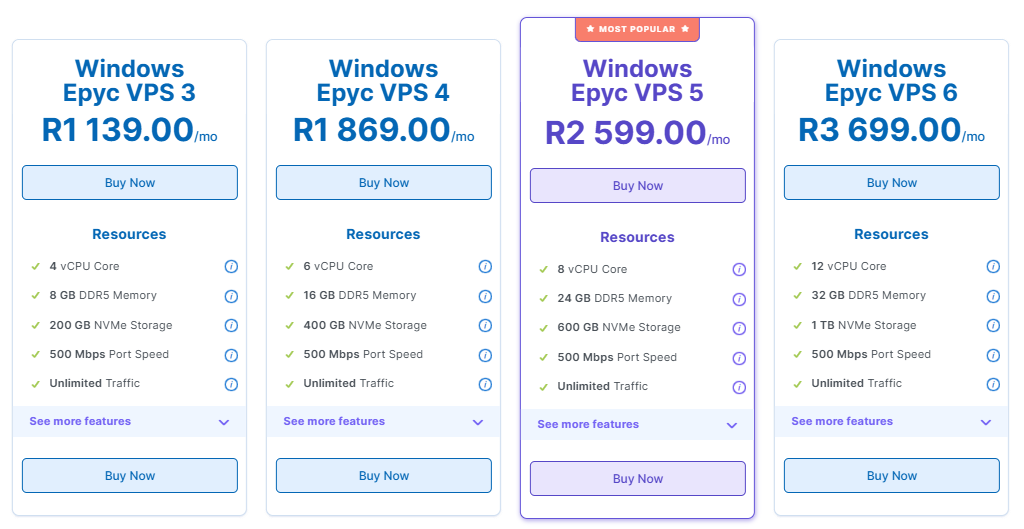
Windows VPS Hosting: Epyc VPS 3 vs VPS 4 Package
| FEATURE | EPYC VPS 3 | EPYC VPS 4 |
| vCPU (Cores) | 4 | 6 |
| RAM | 8 GB DDR5 ECC | 16 GB DDR5 ECC |
| Storage | 200 GB NVMe | 400 GB NVMe |
| Port Speed | 500 Mbps | 500 Mbps |
| Traffic | Unlimited (subject to AUP) | Unlimited (subject to AUP) |
Strengths & Use Cases
- Epyc VPS 3: Ideal for smaller applications, development or test servers, low-to-medium traffic websites, or businesses starting out. The 4 vCPUs and 8 GB RAM provide a good baseline at a lower cost.
- Epyc VPS 4: Better suited for heavier workloads, moderate web applications, databases, or production environments where more RAM and CPU are necessary. With 6 vCPU and 16 GB RAM, you get significantly more computing power and double the NVMe storage.
Considerations
- If your usage grows over time, upgrading from VPS 3 to 4 is relatively simple with Domains.co.za.
- Both plans include full admin access, monthly backups, and a 99.9% uptime guarantee.
- Since storage is NVMe (very fast), even the 200 GB on VPS 3 will perform well for many use cases.
Recommendation
- Choose VPS 3 for cost-efficiency and lightweight usage.
- Choose VPS 4 for more demanding applications or if you expect medium-term growth.
Additional Information
- You can upgrade your VPS resources (vCPU, RAM, NVMe) at any time via the Domains.co.za management interface.
- You receive free monthly snapshot backups by default. If you require more frequent restores or critical systems, consider adding weekly backups.
- All VPS plans include IPv4 and an IPv6 /64 range, giving flexibility as you scale.
- Domains.co.za offers a 30-day guarantee, so you can test the performance risk-free.
- The servers are hosted in Teraco, Johannesburg, which is great for local performance and latency.
Login to Domains.co.za Account
1. Go to the Domains.co.za website Account Login page.

2. Enter your Email and Password and click the Sign In button.
3. You will see the Domains.co.za Dashboard, displaying the Manage Account menu on the left and your Account Information, Account Overview and Open Support Tickets on the right.


