


The WordPress get_post_meta function is a useful tool for developers who need to retrieve custom field data and display it dynamically on a WordPress website. Post metadata can be used to store additional information associated with a post, page or custom post type, allowing developers to extend WordPress beyond the standard title, content and featured image fields.
For example, a website could use custom fields to store a reading time, product price, event date, author note, service label or image URL. The get_post_meta() function can then retrieve that information so it can be displayed in a WordPress template or used by other PHP code.
This guide explains how the WordPress get_post_meta function works, how its parameters are used, and how to safely retrieve and display custom field data. The examples are intended for WordPress developers, agencies, technically confident website owners and administrators with basic PHP knowledge.
WordPress stores post metadata separately from the main post content. The get_post_meta() function retrieves metadata associated with a specific post ID. WordPress describes the function as retrieving a post meta field for a given post ID, with the $single parameter determining whether one value or an array of values is returned.
The function can be used with standard posts and pages as well as custom post types. This makes it useful when building custom WordPress websites where additional information needs to be displayed dynamically.
TABLE OF CONTENTS
What Is the get_post_meta Function in WordPress?
get_post_meta() is a WordPress function used to retrieve metadata, also commonly called custom field data, from a specific post, page or custom post type.
Its basic syntax is:
get_post_meta( $post_id, $key, $single );The function returns the requested metadata based on the post ID and custom field key.
What Are Custom Fields & Post Metadata?
Custom fields allow additional information to be associated with a WordPress post. This information can include:
- Reading time.
- Product or service details.
- Author notes.
- Ratings.
- Prices.
- Locations.
- Event dates.
- Custom labels or badges.
- Additional image URLs.
Post metadata should not be confused with user meta, term meta or site options, which are stored and retrieved using different WordPress functions. WordPress provides separate functions for different types of metadata.
When Would You Use get_post_meta?
You could use get_post_meta() when you need to:
- Display a custom reading time.
- Show an author biography or additional author information.
- Add product or service details.
- Display a custom image.
- Show an event date.
- Add custom labels or badges.
- Retrieve information associated with a custom post type.

Before You Begin
Before working with get_post_meta(), ensure you have:
- WordPress administrator access.
- Access to a child theme, custom plugin or code snippet tool.
- A recent backup of the website.
- A staging website where possible.
- The exact custom field key.
- Basic PHP knowledge.
- An understanding of where the information should appear on the website.
Important Safety Note Before Editing WordPress Files
Avoid editing the files of a parent theme directly. Theme updates can overwrite those changes.
Instead, use a child theme, site-specific plugin or reputable code snippet tool. A staging website is also recommended when testing PHP changes, particularly on a production website.
If a PHP change causes a critical error, check the WordPress error logs or enable WordPress debugging in an appropriate development or staging environment rather than exposing debugging information publicly on a live website.
get_post_meta Syntax Explained
The basic syntax is:
get_post_meta( $post_id, $key, $single );It accepts three main parameters:
$post_id
$post_id is the ID of the post, page or custom post type item containing the metadata.
When working with the current post inside the WordPress Loop, get_the_ID() can be used to obtain the current post ID.
$key
$key is the custom field name that you want to retrieve. Examples include reading_time, price and event_date.
The key must match the key used when the metadata was stored.
$single
$single determines whether WordPress returns one value or an array.
Setting $single to true returns a single value. Setting it to false returns an array of values.
Basic Example: Display One Custom Field
A simple example for displaying a reading time is:
$reading_time = get_post_meta( get_the_ID(), 'reading_time', true );
if ( ! empty( $reading_time ) ) {
    echo '
}
get_the_ID() retrieves the ID of the current post. The reading_time value identifies the custom field, while true requests a single value.
The if statement checks whether the field contains a value before displaying it. esc_html() then safely escapes the value for HTML output. WordPress recommends escaping data when it is output, using the escaping function appropriate for the context.
Why Escaping Output Matters
Metadata can originate from user input, plugins or database values, so it should not simply be output directly.
Use the appropriate WordPress escaping function for the output context:
- esc_html() is suitable for text displayed within HTML.
- esc_url() should be used for URLs.
- esc_attr() should be used for HTML attributes such as alt, title and value.
How to Add get_post_meta to a WordPress Template
Step 1: Use a Child Theme
Use a child theme when customising theme templates so your changes are less likely to be overwritten by parent theme updates.
Step 2: Find the Correct Template File
Locate the template responsible for displaying the content. Standard posts often use single.php, while pages may use page.php. Custom post types can use templates such as single-service.php or single-product.php.
Step 3: Add the get_post_meta Code Where the Value Should Display
Add the code inside the WordPress Loop or another context where the correct post ID is available.
Step 4: Save and Test on the Front End
Save the changes and test the website. Check both posts containing the custom field and posts where the field has not been populated.
How to Display get_post_meta with a Code Snippet Plugin
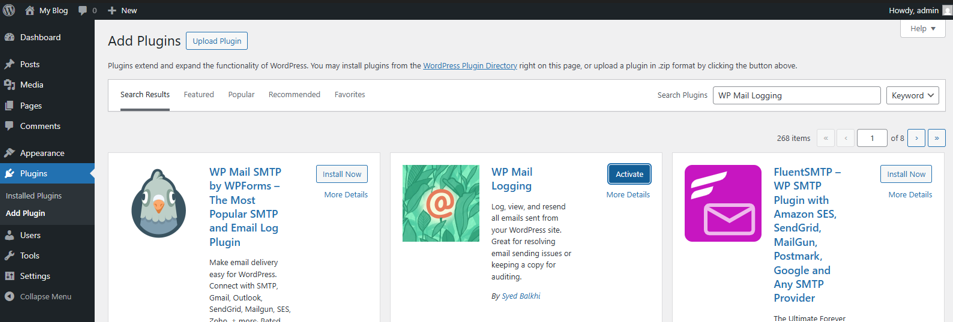
A code snippet plugin can provide an alternative to manually editing theme files. WPCode is one example, but you should check the plugin’s current compatibility, reviews and maintenance status before installing any third-party plugin.
Step 1: Choose a Reputable Code Snippet Plugin
Install a reputable and actively maintained solution from a trusted source.
Step 2: Add a PHP Snippet
Create a PHP snippet containing your get_post_meta() code and use the correct custom field key.
Step 3: Choose Where the Snippet Runs
Limit the snippet to the required location or post type where possible. Avoid running code globally unless it is designed to do so.
Step 4: Save, Activate and Test
Test the snippet on staging first where possible. After activation, check the relevant pages and confirm that the expected information is displayed.
How to Check Whether a Custom Field Exists
You can check whether a custom field contains a value before displaying it:
$value = get_post_meta( get_the_ID(), 'custom_field_key', true );
if ( ! empty( $value ) ) {
    echo esc_html( $value );
}
This prevents empty labels or blank sections from appearing when the custom field has not been populated.
When a valid post ID and $single is true are used, WordPress returns an empty string when the requested metadata does not exist.
How to Retrieve Multiple Values
If the same custom field key contains multiple values, set $single to false:
$values = get_post_meta( get_the_ID(), 'custom_field_key', false );
foreach ( $values as $value ) {
    echo '
}
This returns an array, which should be handled appropriately before output.
How to Display an Image Stored in Post Meta
If a custom field stores an image URL, retrieve and escape it before placing it in an HTML attribute:
$image_url = get_post_meta( get_the_ID(), 'custom_image', true );
if ( ! empty( $image_url ) ) {
echo ' . ') ';
}
';
}esc_url() is designed for URLs, including URLs used in src and href attributes, while esc_attr() should be used for other HTML attributes.
How to Use get_post_meta with Custom Post Types
get_post_meta() works with custom post types because the function retrieves metadata using the relevant post ID. This means the same basic approach can be used for posts, pages and custom post types.
For example, a service custom post type could have an estimated_duration field that is retrieved and displayed using the same function.
Common get_post_meta Mistakes
Common mistakes include:
- Using the incorrect custom field key.
- Forgetting to retrieve the correct post ID with get_the_ID().
- Using $single = true when multiple values are expected.
- Displaying metadata without escaping it.
- Editing parent theme files directly.
- Running snippets globally without appropriate conditions.
- Expecting a value to display when the custom field does not exist.
- Confusing post meta with user meta, term meta or site options.
- Assuming every custom field plugin stores data in the same format.
Troubleshooting get_post_meta Not Showing Data
If the value does not appear, check the following:
- Confirm that the custom field key is correct, including its capitalisation.
- Confirm that the correct post ID is being used.
- Ensure the post contains the custom field.
- Check whether the value is stored as an array rather than a simple string.
- Check whether a plugin such as Advanced Custom Fields (ACF) manages the field and whether it uses a particular data structure.
- Clear applicable WordPress and hosting caches.
- Confirm that you edited the correct template file.
- Check the WordPress error logs for PHP errors.
- Use WordPress Debug Mode in a suitable development or staging environment when troubleshooting PHP problems.
If a plugin or custom field solution stores arrays or objects, additional handling may be required rather than treating the returned value as a simple string.
Additional Information
- get_post_meta() retrieves metadata associated with a WordPress post ID and can be used with posts, pages and custom post types.
- The $single parameter determines whether WordPress returns a single value or an array of values.
- get_the_ID() is useful when retrieving metadata belonging to the current post within the WordPress Loop.
- Custom field keys must match the metadata key stored for the relevant post.
- Metadata should be escaped at the point where it is output, using a function appropriate to the output context.
- esc_html() should be used when displaying metadata as HTML text, while esc_url() should be used for URLs and esc_attr() for HTML attributes.
- You should avoid editing parent theme files directly because theme updates can overwrite your customisations.
- A child theme, custom plugin or reputable code snippet solution is generally a safer approach for adding custom PHP functionality.
- A recent backup and staging environment are recommended before testing PHP changes on a production website.
- Custom field plugins may store complex data structures, so you should not assume every metadata value is a simple text string.
- Post metadata is different from user metadata, term metadata and site options, which have their own WordPress APIs.
- If a PHP change causes an error, review the WordPress error logs and test the code in a staging environment before applying further changes to the live website.
Login to Domains.co.za Account
1. Go to the Domains.co.za website Account Login page.

2. Enter your Email and Password and click the Sign In button.
3. You will see the Domains.co.za Dashboard, displaying the Manage Account menu on the left and your Account Information, Account Overview and Open Support Tickets on the right.


